
Digital Image Recovery · Photo Recovery Service · SD Card · microSD · CompactFlash · RAW Files · Chip-Off
Digital Image Recovery Service — Recover Deleted Photos from SD Cards, Memory Cards & Flash Storage
Can photos be recovered from a formatted or unreadable SD card?
Yes — formatting marks space as free without erasing the images, so the photos usually remain on the card’s NAND flash chips. eProvided reads those chips directly, bypassing a dead controller or corrupted file system entirely. Cracked, water-damaged and unrecognized cards are recovered this way, at an average 98% success rate with a free evaluation first.
“A formatted card is not a wiped card — the pictures are still sitting in the flash, waiting for someone to read the chip instead of the file system.” — Bruce Cullen, founder, eProvided
Digital image recovery is the engineering process of retrieving lost, deleted, corrupted, or inaccessible photos and video from SD cards, microSD cards, CompactFlash, USB flash drives, and SSDs — the flash storage your camera and phone rely on. When you delete a photo, crack a card, or a memory card stops responding, your images still live on the NAND flash chips inside. eProvided’s photo recovery service reads those chips directly — chip-off extraction, raw NAND dumps, and file-system reconstruction — to recover deleted photos and pictures other labs declare gone. Find out what is still on the card — call (866) 857-5950 or start a free photo recovery evaluation today.
Lost photos can feel like a punch to the gut, especially when they hold irreplaceable memories. Whether you accidentally deleted a vacation album, formatted a camera’s memory card, or watched your SD card stop responding mid-shoot, professional image recovery is often your best path forward. The moment you notice missing images, stop using the card immediately — do not take new photos, transfer files, or try to format or repair it. Every write operation risks permanently overwriting recoverable data.
Over the past 27+ years, eProvided has recovered millions of photos, videos, and files from every type of flash storage imaginable. Our SD card recovery service has helped professional photographers, government agencies, and everyday consumers get their pictures back — with a simple promise: No Data, No Data Recovery Fee. See our federal & aerospace work.
- What is digital image recovery
- Common causes of photo & data loss
- SD card types & memory devices we recover
- Camera brand recovery — every major manufacturer
- Digital picture, photo & deleted photo recovery
- Photo recovery near me — worldwide
- Our digital image recovery process
- Why choose eProvided
- Professional recovery vs DIY software
- Can you recover deleted photos
- 5 signs your memory card is failing
- Customer reviews
- Digital image recovery FAQ
- Further reading
- Other devices we recover
What Is Digital Image Recovery?
 Enlarge
Digital image recovery is the process of retrieving lost, deleted, corrupted, or inaccessible photos and files from storage devices like SD cards, microSD cards, CompactFlash cards, USB flash drives, and SSDs. When you delete a photo or format a card, the data does not vanish immediately — the file system simply marks that space as available. If new data overwrites those sectors, recovery becomes significantly harder, and in some cases impossible. That is why our number-one rule is to stop using the card the instant you realize photos are missing.
At eProvided, our photo recovery service goes far beyond what consumer software can achieve. We connect directly to the NAND flash memory chips inside your device, bypassing damaged controllers and corrupted file systems entirely. This chip-level approach, sometimes called chip-off recovery, gives us access to raw data no software tool can reach. Whether you are a professional photographer who lost an entire wedding shoot or a parent whose toddler snapped a microSD card in half (yes, it happens more than you would think), we have the tools and expertise to recover your pictures.
eProvided has been used by NASA and JPL on multiple missions, including recovering water-damaged CompactFlash cards from the Helios solar aircraft after it crashed into the Pacific Ocean and sat submerged in saltwater for weeks. When NASA’s Mars Rovers experienced data glitches caused by damaged NAND flash wafers, eProvided consulted on how storage algorithms worked at the controller level. We have also worked directly with the FBI on bioterrorism investigations, the Special Agents, and the U.S. Department of the Navy, respecting NIST SP 800-86 digital forensic standards for chain-of-custody integrity. If we can handle space-grade recovery, your family photos and professional files are in excellent hands. For more on the chips underneath every card, see our guide to how NAND flash actually fails.
Lost Photos on an SD Card? We’ll Get Them Back.
Free evaluation on every case — deleted, formatted, water-damaged, or unrecognized cards, any brand, any format. No Data, No Data Recovery Fee.
Get My Free EvaluationOr call (866) 857-5950
Common Causes of Photo & Data Loss on Memory Cards
 Enlarge
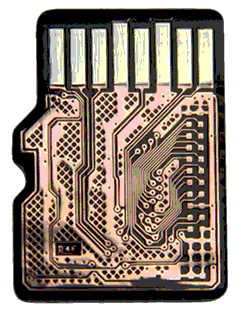
Understanding why memory cards fail helps you prevent data loss in the future and, more importantly, tells you what not to do once images go missing. Accidental deletion or formatting is the number-one reason clients contact us — one wrong tap and your camera formats the card, wiping every image instantly. Physical damage runs a close second: cracked, bent, or water-damaged SD cards from drops, heat, or even pet chewing, and yes, we have recovered photos from cards that went through the washing machine. Corruption from improper removal is another frequent cause — pulling a card out of a camera or computer while files are still writing corrupts the file system in the middle of a write.
Wear and tear also takes a toll. Consumer SD cards use TLC or QLC NAND, which tolerates roughly 3,000 write cycles, and photographers who constantly delete and reshoot can exhaust that within 1–2 years of heavy use. Shooting on a low battery can cause the same kind of damage from a different direction — a camera that dies mid-write leaves incomplete writes and corrupted file headers behind. Cards used across multiple devices can also pick up a virus or malware infection that scrambles file structures, and ironically, one of the most common causes we see is a failed recovery software attempt: running the wrong consumer tool on a damaged card can overwrite the very data you were trying to save.
Industry statistics show professional recovery services achieve success rates between 70% and 96% depending on the type and severity of damage. At eProvided, our proprietary tools and 200+ specialized hardware instruments push our success rate to the top of that range — an average of 98% across all flash cases. For severely damaged cards we employ chip-off recovery, physically removing NAND wafers from the circuit board and reading them under a microscope, rebuilding file structures byte by byte. If you have experienced any of these issues, do not wait — start your free evaluation.
SD Card Types & Memory Devices We Recover
Flash memory comes in dozens of shapes and sizes, and eProvided handles them all. Whether it is a standard SD card from a DSLR or a tiny microSD pulled from a GoPro, our engineers have the specialized readers and extraction tools for every format. We routinely recover from SDHC and SDXC cards, microSD and microSDHC, CompactFlash (CF), Sony Memory Stick, eMMC and embedded flash, and full-size SSDs. Here is a breakdown of the devices we work with daily:
| Memory Card & Storage Device Recovery Comparison | ||
|---|---|---|
| Device Type | Common Use | Recovery Complexity |
| SD / SDHC / SDXC | DSLR cameras, camcorders | Standard to moderate |
| MicroSD / MicroSDHC | Smartphones, drones, dashcams | Moderate (monolithic chips) |
| CompactFlash (CF) | Professional cameras, industrial | Standard |
| USB Flash Drives | File transfer, portable storage | Varies by controller type |
| SSD (SATA / NVMe / M.2) | Laptops, desktops, NAS | Advanced (encryption common) |
| Memory Stick (Sony) | Older Sony cameras, PSP | Standard to moderate |
| eMMC / Embedded Flash | Tablets, smartphones | Advanced (soldered chips) |
No matter the manufacturer — SanDisk, Samsung, Kingston, Lexar, or Sony — our lab has recovered data from every major brand and card format. We work with every camera system too: Canon, Nikon, Sony, Fujifilm, Olympus, and Panasonic bodies, including their RAW files (Canon CR2/CR3, Nikon NEF, Sony ARW, and Adobe DNG). We routinely handle drone SD card recovery from DJI and GoPro devices, dashcam SD card recovery, trail-camera cards from hunters and researchers, and Nintendo Switch microSD cards full of saved games. Wedding and event photographers trust us with their most critical shoots because some photos simply cannot be re-taken. If your photos live on a failed drive instead of a card, see how we bring back files from a dead SSD. Photos stranded on a thumb stick with a snapped connector get the same case-by-case evaluation, and we describe that work for a broken USB stick too. The tiniest micro SD cards are covered as well. We also recover the older photo formats — xD Picture Card recovery, MMC, and Microdrives from legacy cameras.
Camera Brand Recovery — Every Major Manufacturer
Every camera system writes its photos a little differently, and eProvided recovers them all. Whether your images come off a Canon, Nikon, Sony, Fujifilm, Olympus, Panasonic, Pentax, or Leica body, our engineers reconstruct both standard JPEGs and the proprietary RAW formats each brand uses — Canon CR2/CR3, Nikon NEF, Sony ARW, Fujifilm RAF, Olympus ORF, Panasonic RW2, and Adobe DNG. RAW files carry far more data than a JPEG, which makes their headers and structure more fragile when a card corrupts; our chip-level recovery rebuilds them directly from the NAND rather than relying on the camera’s own (now-broken) index.
We recover from every card brand too — SanDisk, Samsung, Kingston, Lexar, Sony, PNY, Transcend, ADATA, and Patriot — in every form factor, from a pro DSLR’s CompactFlash to a mirrorless body’s SDXC or a drone’s microSD. Wedding shooters, photojournalists, wildlife and trail-camera users, and everyday families all send us cards that hold pictures nothing else can replace.
Digital Picture Recovery, Digital Photo Recovery & Deleted Photo Recovery
 Enlarge
The words change — digital picture recovery, digital photo recovery, image recovery, deleted photo recovery — but the engineering is the same: getting your pictures back off flash storage that no longer hands them over. Accidentally deleted an album? Formatted the wrong card? Watched a card go unreadable mid-shoot? Those are the exact cases our lab clears every day. Because deleted and formatted photos usually still sit intact on the NAND until something overwrites them, the single most important step is to stop using the card and start a free evaluation. From there we recover deleted photos, corrupted RAW files, and whole formatted card contents — then return them to you on fresh media.
Think of a card full of photos the way you think of a shoebox of old prints. Nobody keeps a spare copy of a family trip or a wedding, so the card is often the only record. That is why we handle every case one at a time: we read what is on the card, list the pictures we can see, and send that list to you for confirmation before you pay anything. No two cards fail the same way, so we never promise a result before we have looked.
Photo Recovery Near Me — One Las Vegas Lab, Worldwide Reach
Searching for “photo recovery near me” rarely needs a local storefront — the best lab for your card may not be in your city, and a tracked envelope reaches us from anywhere in minutes of your time. eProvided serves the entire United States (and over 40 countries) through secure shipping to our lab. Start with a free inbound evaluation, ship the card by any carrier you like with tracking, and we diagnose it at no cost before any work begins. Ship it in, or bring it by — call first. Either way it is the same lab, the same bench that puts a specialized NAND lab within reach no matter where you live. Send your card to eProvided · 9527 Knopfler Ln, Las Vegas, NV 89148 · (866) 857-5950, and your recovered photos come back on a new drive via tracked, insured shipping.
Our Digital Image Recovery Process: Step by Step
 Enlarge
Wondering what happens after you send in your damaged memory card? Here is exactly how our memory card recovery process works, from start to finish — methodical, not guesswork:
- Submit your device — fill out our free evaluation form and ship your storage device to our Las Vegas lab using any carrier (USPS, FedEx, or UPS — your choice).
- Free diagnostic evaluation — our engineers examine the device under magnification, identify the type and extent of damage, and determine the best recovery approach. You receive a detailed explanation and quote within 24–48 hours.
- Lab recovery — using over 200 proprietary tools, we perform the recovery. For logical damage we rebuild corrupted file systems; for physical damage we use chip-off NAND extraction in our controlled lab environment.
- Quality check & file listing — we verify every recovered file, organize them by type, and send you a complete listing so you can confirm your photos and data are intact before payment.
- Secure return — your recovered data is transferred to a new storage device and shipped back via tracked, insured shipping. All original data is securely erased from our systems after 30 days, or sooner on request.
The entire process typically takes 3–5 business days for standard cases, with emergency rush service available for time-sensitive recoveries. We have seen everything from wedding photographers who need images before an anniversary to legal firms requiring forensic-grade extraction for court deadlines. One thing that sets our process apart is transparency — you receive updates at every step, and we never charge a recovery fee if we cannot recover your data. No Data, No Data Recovery Fee.
See Our Recovery Process in Action
Prefer to watch how chip-off photo recovery actually works? Our short lab walkthrough shows engineers reading raw NAND from a damaged card and rebuilding the images byte by byte — watch the eProvided recovery process on YouTube.
Why Choose eProvided for Digital Image Recovery?
With dozens of data recovery companies advertising online, what makes eProvided different? In a word: experience. Founded in 1999, eProvided has been at the forefront of flash media recovery since before SD cards were mainstream — 27+ years recovering photos and files off flash memory. That experience is why eProvided is used by NASA, JPL, the FBI, and the U.S. Navy: we recovered critical data from NASA’s Helios mission after its crash into the Pacific, consulted on Mars Rover data-glitch issues, and have handled FBI bioterrorism cases and Department of the Navy work.
Behind every case sit over 200 proprietary recovery tools — custom-built hardware that connects directly to NAND flash wafers, bypassing damaged controllers and corrupted firmware entirely. That hardware, combined with our engineers’ experience, pushes our average success rate to 98% across all device types, consistently ahead of industry averages, and we back it with a simple guarantee: No Data, No Data Recovery Fee. We never charge a recovery fee unless we successfully retrieve your files, period. Clients from over 40 countries ship devices to our Las Vegas headquarters for recovery, with secure shipping both ways.
Beware of competitors boasting dozens of city offices — many are unstaffed addresses charging far more for the same work. We bring the full weight of our 27+ years to every case, whether it is a student’s lost thesis photos or a small business’s only backup.
Don’t Wait — Photo Damage Gets Worse.
Free evaluation — used by NASA & the U.S. government, 98% average recovery success on SD card & photo cases. No Data, No Data Recovery Fee.
Get My Free EvaluationOr call (866) 857-5950
Professional Image Recovery vs DIY Software: What Actually Works?
We get it — your first instinct when photos disappear is to Google “free photo recovery software” and try to fix things yourself. Sometimes that works, but more often it makes the problem worse. Here is an honest breakdown.
When software might work: if you accidentally deleted a few photos from a healthy card and have not used it since, a reputable recovery tool can sometimes retrieve them. The card must be physically intact and the deleted sectors must not have been overwritten.
When software will fail (or make things worse, which happens often):
- The card is physically damaged, cracked, or not detected by your computer.
- The file system is corrupted beyond what software can parse.
- The NAND controller firmware has failed.
- You have already run one recovery tool and it partially overwrote data.
- The card uses a monolithic design where the controller and memory are fused into a single chip.
In our experience, roughly 40% of clients who contact eProvided have already attempted software recovery before reaching out — and in many of those cases the software made the situation harder to recover from. Professional digital photo recovery uses hardware-level tools that read data directly from the flash chips, completely bypassing the card’s electronics. It is the difference between reading a water-damaged book through foggy glasses versus putting it under a professional document scanner. For more prevention tips, visit our data recovery blog.
Can You Actually Recover Deleted Photos from an SD Card?
 Enlarge
Yes — deleted files can often be recovered if you act quickly. When you delete a photo from an SD card, the data itself remains on the NAND flash chips; only the file-system “pointer” that tells your camera where to find that photo gets removed. Think of it like tearing the table of contents out of a book — the chapters are still there, you just lost the index.
However, the moment you take new photos or save new files to that card, the old data gets overwritten permanently. This is why every recovery professional tells you the same thing: stop using the card the instant you realize files are missing. eProvided’s micro SD card data recovery handles everything from simple accidental deletions to complex scenarios involving cracked cards, water damage, and heat exposure. We have recovered images from SD cards snapped in half, melted in car dashboards, and chewed up by dogs. If the NAND flash chips are still intact, there is a strong chance we can get your pictures back. For a detailed walkthrough, read our guide on lost pictures and SD card recovery.
5 Signs Your Memory Card Is Failing
Do not wait until complete failure. Watch for these early warning signs that your SD card or microSD card needs attention — and when you see one, back up immediately and stop writing new photos.
Intermittent read errors are often the first clue: your camera or computer sometimes cannot read the card, then it works fine again, and that on-and-off behavior usually signals degrading NAND cells or a failing controller. Slow write speeds are another early tell — if your camera suddenly takes much longer to save photos, the card may be reaching its write-cycle limits, since consumer TLC NAND typically lasts around 3,000 program-erase cycles. Missing or corrupted files are a third sign: you took 200 photos but only 150 show up, or thumbnails appear but full-resolution images will not open, usually because file headers or allocation tables are damaged.
A “card not formatted” error is a louder warning — when your device suddenly asks you to format a card that worked yesterday, the file system has likely become corrupted, and you should not format it. Physical signs of damage matter too: hairline cracks, bent pins, or discoloration from heat or water can sever internal connections between the controller and NAND chips even when nothing looks obviously broken on the outside. Early intervention dramatically improves recovery success rates. For broken or cracked cards, see our broken SD card recovery guide.
What Our Customers Say
For more reviews, read all 67 verified reviews on Trustpilot.
Frequently Asked Questions About Digital Image Recovery
Cost, Timing and Shipping
Q: How much does digital image recovery cost?
A: Recovery cost depends on the type and severity of damage. The evaluation is always free, so you know exactly what to expect before committing. Our pricing is consistently below major competitors, and we never charge a recovery fee if we cannot recover your files — our No Data, No Data Recovery Fee guarantee. For details, see what our evaluations actually cost.
Q: Will my SD card still work after recovery?
A: It depends on the cause of failure. If the loss was caused by accidental deletion or formatting with no physical damage, the card may still be usable. If it has physical damage, corrupted firmware, or worn-out NAND cells, we recommend replacing it — your data is returned on a new storage device.
Q: How long does the recovery process take?
A: Standard cases complete within 3–7 business days after we receive your device. Emergency rush service is available for urgent situations, and you receive status updates throughout.
Q: Is it safe to ship my memory card for recovery?
A: Yes. We provide detailed shipping instructions and recommend anti-static packaging. eProvided serves clients worldwide from our Las Vegas headquarters with tracked, insured shipping both ways. Your data is encrypted during storage and securely erased after 30 days.
Damaged Cards and What We Can Recover
Q: Can you recover photos from a water-damaged memory card?
A: Absolutely — water damage is one of our specialties. eProvided recovered data from NASA’s Helios mission CompactFlash cards after they sat in the Pacific Ocean for weeks. Whether your card went through the wash or fell in a pool, our chip-off NAND extraction can often retrieve the data even when the card itself is beyond repair. (For liquid-damaged phones — Apple iPhone and Google Pixel / Android alike — see how we handle a dunked phone. For a phone that is damaged in some other way, read about our broader smartphone recovery work.)
Q: What file types can you recover from memory cards?
A: We recover all common photo formats (JPEG, PNG, TIFF, and RAW formats including Canon CR2/CR3, Nikon NEF, Sony ARW, and Adobe DNG), video files (MP4, MOV, AVI, ProRes), audio, and documents. Whether it is professional RAW photo recovery from a Canon, Nikon, Sony, Fujifilm, Olympus, or Panasonic shoot or dashcam footage from an accident, if it was stored on the card we can typically recover it.
Why Memory Cards Fail
Q: Why do microSD cards and CompactFlash cards fail?
A: Flash memory has a limited number of write cycles. Consumer microSD cards use TLC NAND with roughly 3,000-cycle endurance. Combined with physical stress from insertion and removal, heat exposure, and electrical issues from low-battery operation, failures are common — especially for photographers shooting thousands of images daily.
Ready to Recover Your Photos?
Free evaluation, firm quote, then recovery. Recovering deleted and damaged photos since 1999 with a 98% success rate.
Get My Free EvaluationOr call (866) 857-5950
Further Reading: Photo & Video Recovery Guides
- Digital picture recovery from USB flash drives.
- Lost your pictures? What to do next.
- Recovering deleted photos from Android phones — including unrecognized microSD cards.
- Repairing corrupted MOV & MP4 video files — fixing damaged footage from SD/SDHC cards.
- Recovering deleted 4K video — storage and device compatibility.
- Data storage devices 101 — the devices that store your photos.
Helpful External Resources
- NIST SP 800-86: Guide to Digital Forensic Techniques — industry-standard guidelines for forensic data handling.
- SD Association — the official standards body for SD card technology and specifications.
- NASA Helios Recovery Operations — background on the Helios mission recovery effort.
Looking for our full lineup of Related Recovery Services? eProvided recovers SD cards, microSD, CompactFlash, USB drives, SSDs, hard drives, and smartphones — the cross-sell cards below link straight to each device’s dedicated page.
Other Devices We Recover
Photos lost on more than an SD card? eProvided recovers every storage class from one lab. Choose your device: