
SSD Data Recovery
Expert SSD Data Recovery Services: Recover Lost Files from Failed Solid State Drives
Can data be recovered from a dead M.2 SSD?
Yes — in most cases. An M.2 drive that vanished from BIOS usually still holds your files; what failed is the controller that reads them. Because that same controller holds the key your data is scrambled with, your files are recovered by reviving the original controller, not by reading the memory alone. Free evaluation, since 1999.
“On a modern M.2 drive the controller is the only thing that can unscramble your files — so that is what we bring back.” — Bruce Cullen, founder, eProvided

Yes, data can be recovered from a failed SSD — even a drive that won’t mount, vanished from BIOS, or reports 0 bytes. eProvided brings the drive’s own controller back to life so the NAND flash chips can be read the way the drive always read them, across NVMe, M.2, SATA, and external SSDs. Free evaluation, and No Data, No Data Recovery Fee — since 1999.
At eProvided, we specialize in retrieving data from failed, formatted, corrupted, or physically damaged solid state drives, including dead SSD and SSD failure cases. Whether it's an internal NVMe, M.2, SATA, PCIe SSD, a dead SSD, or an external portable model from Samsung, SanDisk, WD, or any brand, our engineers have the tools and experience to get your files back.
SSDs deliver incredible speed and reliability in everyday use, but failures can strike without warning. Common triggers include controller failure, power surges, wear exhaustion, firmware corruption, or physical drops. The TRIM command — designed to keep performance snappy — can make deleted files harder to recover with basic tools. Fortunately, our lab works past these hurdles at the hardware level, restoring the drive’s own controller so the NAND flash memory chips can be read in their original order.
We’ve recovered data from thousands of SSDs that others considered hopeless. From vital business documents to priceless family photos, we handle every case with urgency and precision. Many clients reach out after accidental formatting or deletion, fearing permanent loss. In most situations, advanced SSD data recovery techniques restore everything, even from drives that seem completely dead.
Our expertise covers all major manufacturers and the latest standards, including PCIe 5.0 and NVMe drives from the NVM Express organization. We prioritize strict confidentiality and secure handling throughout the process.
Ready to recover your files? We provide a free evaluation and no-data, no data recovery fee guarantee.
Every data recovery SSD case starts with that free evaluation — ship us the drive, we diagnose it, and you only pay when we deliver your files.
Free SSD Data Recovery Evaluation
Ship your drive to our lab — we diagnose the failure for free. No Data, No Data Recovery Fee.
Get My Free EvaluationOr call (866) 857-5950
- Why Choose eProvided
- Common Signs of SSD Failure
- Our SSD Recovery Process
- Advanced NAND & Chip-Off Techniques
- PCIe, NVMe, M.2 & External SSD Recovery
- All SSD Form Factors Supported
- 2024–2026 Failure Scenarios
- Chip-Off Deep Dive
- Encrypted SSD Recovery
- NASA & Federal Track Record
- Customer Testimonials
- Frequently Asked Questions
- Further reading
- Related services
Why Choose eProvided for SSD Data Recovery?
With 27+ years in the field, eProvided has built a reputation for tackling the toughest SSD cases — including work for NASA JPL, the FBI, and the U.S. Department of the Navy (full track record in the federal section below).
Recent industry reports, such as Backblaze's Q3 2025 Drive Stats, show SSDs maintaining exceptionally low annualized failure rates — often below 1% for many models. Even with this reliability, failures happen, and that’s where our high success rate and transparent no-recovery, no-charge policy shine.
Clients praise our clear communication, regular updates, and ability to succeed where others failed. We never suggest risky DIY tools that could overwrite data permanently. Instead, we use specialized SSD recovery equipment — controller-level repair, firmware work, and NAND-level tooling — and pick the path your drive actually needs.
From personal drives to enterprise NVMe arrays, we deliver the same level of expertise to every client.
Common Signs Your SSD May Be Failing
 Recognizing early warning signs can prevent total data loss. Here are the most frequent indicators:
- Frequent crashes or blue screens during read/write operations
- Files becoming corrupted or inaccessible
- Slow performance despite sufficient free space
- The drive disappearing from BIOS or operating system
- Strange errors like "disk not initialized" or "file system requires repair"
- Bad blocks reported by diagnostic tools
If you notice any of these, stop using the drive immediately and start a free evaluation with us.
Drive Not Detected by Windows or Mac?
eProvided works at the chip and controller level to get SSD data back. Free evaluation — we recover drives other companies turn away.
Get My Free EvaluationOur SSD Recovery Process
Once your drive arrives, we perform a free diagnostic evaluation. Engineers analyze the controller, firmware, and NAND chips to identify the optimal recovery path.
Logical issues (deletion, formatting, corruption) are typically resolved quickly in our lab. Physical problems may require component replacement, firmware repair, or chip-off extraction. For aerospace, government, and other high-stakes failures, see our aerospace and government recoveries.
We supply a secure file list for your review. You only pay after approving recoverable data. Files return on a new encrypted drive or via secure download.
Standard turnaround runs 3–7 days, with rush options for emergencies. This proven process has helped countless clients recover from everything from simple deletions to severe physical damage.
Ship your SSD today and take the first step toward recovery.
Advanced NAND Flash & Chip-Off Recovery Techniques
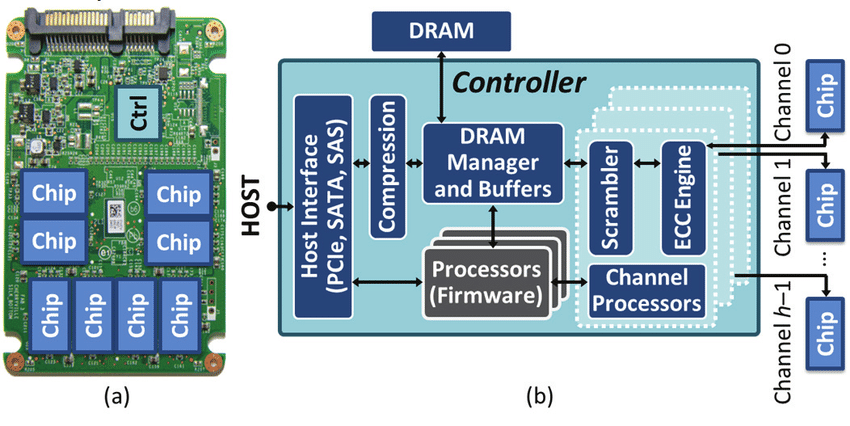
 Some failures call for chip-off recovery: physically removing the NAND flash chips — the parts that hold your files — and reading them with specialized adapters. That gets us past a failed controller board, but never past encryption: on most SSDs made since about 2015 the controller, the small processor that decides where every file is written, holds a key fused into its own silicon, so chips read on their own return scrambled data. We check which kind of drive you have before we choose a path.
Our engineers specialize in SLC, MLC, TLC, and QLC architectures (learn more about SLC, MLC, TLC, and QLC NAND differences). We manage wear-leveling, XOR scrambling, and error correction to reconstruct files accurately.
Chip-off proves especially effective on flash media — USB sticks, memory cards, dashcams — and on legacy SSDs whose controllers do not encrypt; on newer drives we revive the original controller instead. It has rescued data in countless complex failed SSD data recovery cases.
For devices where the entire storage architecture is NAND-based — USB flash drives, memory cards, dashcams, voice recorders, and embedded eMMC chips — our dedicated chip-level recovery process addresses those failures that fall outside standard SSD recovery scope, recovering raw NAND dumps from monolithic chips, multi-chip packages, and bare dies with no working controller.
Explore more in our blog post on NAND flash recovery techniques or SSD drive recovery and NAND chip technology.
PCIe, NVMe, M.2 & External SSD Recovery
 Today’s high-performance SSDs rely on PCIe and NVMe protocols for exceptional speeds. We recover data from all generations — PCIe 4.0, 5.0, and beyond — including Samsung 980/990 PRO, WD Black, and enterprise models.
External portable SSDs like Samsung T7/T9, SanDisk Extreme, and WD My Passport are prone to drops and connector issues. Our lab regularly restores files from unrecognized USB-C enclosures and encrypted external drives.
Regardless of interface — SATA, NVMe, or PCIe — we have the adapters, controller-level tooling, and NAND expertise to find the one path that drive will give data up on. External SSD data recovery ranks among our most frequent requests, with consistently strong success rates.
Our ssd drive recovery process covers every controller family — Sandforce, Marvell, Phison, Silicon Motion, and Samsung’s in-house silicon — so the make of the drive is not what decides whether we can help — the free evaluation tells you that, before you owe anything.
Internal or external, brand-new or years old — we apply the same rigorous methods to give your data the best chance.
For drives that are exclusively solid-state — M.2, PCIe, and NVMe modules — eProvided also runs a dedicated SSD recovery lab, Recover-SSD.com, where the entire workflow is built around solid-state media.
M.2 SSD data recovery and NVMe SSD recovery
M.2 SSD data recovery is the job we see most often now, because an M.2 drive rarely warns you before it goes. One boot it is there, the next it is missing from BIOS entirely. NVMe SSD recovery starts the same way in our lab whatever the label on the drive says: we find out whether the controller can be woken up, because on a modern M.2 or NVMe drive that controller holds the key your data is scrambled with, and nothing else can unscramble it.
That is why we do not reach for the memory chips first. To recover data from an NVMe SSD we repair the board and its firmware until the drive’s own controller answers again, then copy the files off the way the drive always read them. M.2 recovery on a drive that reports 0 bytes, or that vanished after a power cut, is usually a file-translation problem on a controller that is still perfectly good underneath. We tell you which of those you have during the free evaluation and the steps that follow, before you owe anything.
All SSD Form Factors Supported
| SSD Form Factors We Successfully Recover | ||
|---|---|---|
| Form Factor | Common Use | Key Characteristics |
| 2.5-inch SATA | Laptops & desktops | Most affordable & widespread |
| M.2 (SATA & NVMe) | Modern PCs & MacBooks | Compact, high-speed |
| mSATA | Older ultracompacts | Smaller legacy format |
| PCIe add-in cards | Desktops & servers | Maximum performance |
| Embedded/eMMC | Tablets & devices | Soldered onboard storage |
We also handle counterfeit or low-quality SSDs that fail prematurely. Professional SSD data recovery works across every form factor with the right expertise.
Our lab supports all solid state drive and SSD failure recovery designs, maximizing restoration chances regardless of physical layout — part of the full range of data recovery services we offer.
| SSD Brand Recovery Patterns — What We See in 2026 | ||
|---|---|---|
| Brand / Controller | Most Common Failure | Recovery Approach |
| Samsung 970/980/990 Pro | Sudden death under sustained NVMe load; disappears from BIOS | Original-controller revival + firmware repair via PC-3000 SSD |
| WD Blue / Black SN-series | HMB (Host Memory Buffer) corruption after Win11 24H2 update | Controller firmware repair + FTL mapping-table reconstruction |
| SanDisk Extreme / Ultra portable | USB-bridge controller failure (most common 2024-2026) | Replace the failed USB-C bridge, then read through the drive’s own SSD controller |
| Crucial MX/BX/T-series | Phison E12/E16/E18 timeout under sustained write | MRT or PC-3000 with Phison-specific firmware modules |
| Kingston NV2 / Acer FA200 | Maxio MAP1602 power-loss FTL corruption ("0 bytes" reporting) | Rebuild the file translation layer on the drive’s own Maxio controller |
| Intel / Solidigm / enterprise U.2 | Power-cycle failures, encrypted volume lockout | Specialized enterprise SSD recovery + Opal SED key recovery |
What Our Customers Say
Read verified reviews on Trustpilot or join the conversation on our Reddit community.
Ready to Recover Your SSD Data?
Since 1999 — 27+ years of SSD data recovery. 98% success rate. No Data, No Data Recovery Fee.
Get My Free EvaluationOr call (866) 857-5950 • 9527 Knopfler Ln, Las Vegas, NV 89148
Frequently Asked Questions About SSD Data Recovery
Can data be recovered from a failed SSD?
Yes, in most cases. Even with TRIM enabled or physical damage, professional labs like eProvided can often recover data — usually by repairing the drive’s own controller so it reads its NAND again, and on older non-encrypting drives by chip-off. We tell you which applies before you pay.
Is SSD data recovery possible after formatting or deletion?
It is often possible, especially if the drive hasn't been heavily reused. Professional engineers work under TRIM by reading the drive through its own restored controller, before garbage collection clears the NAND chips for good.
How much does professional SSD data recovery cost?
We offer a completely free evaluation. You only pay if we successfully recover your files—no data, no data recovery fee.
How long does SSD data recovery take?
Standard turnaround is 3–7 business days. Rush and emergency options are available.
What makes SSD recovery different from traditional hard drive recovery?
SSDs use complex wear-leveling, encryption, and TRIM, scattering data across chips. Because the encryption key lives inside the controller and never leaves it, this requires specialized tools that revive that controller rather than read the raw NAND memory on its own.
Do you recover data from NVMe, M.2, PCIe, and external SSDs?
Absolutely—we handle all form factors and interfaces from any manufacturer.
Why isn't my NVMe SSD detected in BIOS?
When an NVMe SSD vanishes from BIOS, it's almost always the controller — not the NAND. We see this every week at the lab: a Samsung 990 Pro or WD Black SN850 that boots fine one morning and is gone the next. The usual culprits are a failed controller, a firmware update that got interrupted, a damaged PCIe lane, or an M.2 slot that's been stressed by heat. Whatever you do, stop cycling power to the drive — every retry burns wear cycles and can push a recoverable failure toward a dead one. Ship it to us for a free evaluation — reviving that controller is exactly the work we do, and we tell you honestly if your drive is one where it can't be done.
Can a dead M.2 SSD be recovered?
Yes, in nearly every case — even when the drive itself is finished. The M.2 module may never run again, but your files usually can. Our engineers work on the module itself: replacing failed power components and repairing the board until the drive’s own controller — the chip that holds the key your files are scrambled with — answers again, because on a modern M.2 drive that controller is the only thing that can unscramble them. We recover from every M.2 form factor you'll find in a modern laptop or desktop — 2242, 2260, and 2280 — across PCIe Gen 3, Gen 4, and Gen 5 drives. Brands we see most often: Samsung 980 Pro, 990 Pro, WD SN770, SN850, Sabrent Rocket 4 Plus, Seagate FireCuda 530, and Kingston Fury Renegade.
How is NVMe data recovery different from SATA SSD recovery?
NVMe is faster, hotter, and a lot less forgiving. Because the controller sits right on top of the NAND and everything runs over PCIe, one bad component usually takes the whole drive down at once. A SATA SSD will often warn you first — slow reads, bad blocks, the occasional crash — before it dies. An M.2 NVMe drive just disappears from BIOS and that's that. On our side, NVMe cases need PCIe-specific test hardware, tooling that brings the drive’s own controller back to life, and NAND expertise tuned for the dense TLC and QLC chips that dominate modern M.2 drives.
What causes NVMe SSD controller failure?
Heat is the biggest one. M.2 slots without heatsinks throttle hard, and repeated thermal cycling wears the controller out faster than the NAND. After that: power surges, firmware updates that lose power halfway through, a laptop that got dropped hard enough to crack the PCB or snap the M.2 connector, and counterfeit drives using recycled NAND. The good news — the NAND chips almost always survive all of this. It's the silicon reading them that quits — and because that same controller holds the key your files are scrambled with, our work is to bring it back to life, which is why we succeed when software tools show "drive not detected."
Can you recover SSD drives that won’t initialize or show zero bytes?
Yes. When an SSD fails to initialize or reports 0 bytes, the controller has entered a protected “panic” mode. Our data recovery SSD process brings that controller out of panic mode with firmware-level tooling, so it hands over the SSD data sitting on its NAND chips. This ssd drive recovery workflow is identical whether the drive fails to POST, disappears from BIOS, or locks itself during a firmware rollback — if other labs told you the drive is dead, we can usually still recover SSD contents by getting that controller running again.
Can you recover data from an encrypted SSD or self-encrypting drive (SED)?
Yes, with one caveat: we need the password or recovery key. With it, we unlock the drive through its own controller and image it decrypted — done on Samsung SED, Crucial Opal, BitLocker Surface drives, and Kingston KC600 units. Without the key, the data is mathematically inaccessible by design, and we tell you that during the free evaluation. Full details in the encrypted SSD recovery section.
Do you recover data from external and portable SSDs like Samsung T7, WD My Passport, and SanDisk Extreme?
Yes — external and portable SSDs are one of our most common case types. Samsung T7/T9, SanDisk Extreme, WD My Passport, Crucial X8/X9, LaCie Rugged, and Lexar SL drives all pair internal-style NAND with a USB-C bridge controller; when the bridge dies ("USB device not recognized"), we go around it and talk to the drive's own SSD controller, which is what holds the NAND in readable order. Drops, water exposure, snapped USB-C ports, and password-locked enclosures (key required) are all recoverable.
SSD Failure & SSD Data Recovery Service for 2024-2026 Failure Scenarios
SSD failure in 2024-2026 looks different than five years ago. Modern controllers, DRAM-less designs, NVMe Gen4/Gen5 interfaces, and TLC/QLC NAND each introduce specific failure modes our recovery specialists handle every week. Below are the dominant scenarios driving current SSD data recovery service requests — including SSD drive recovery and NVMe data recovery from drives Windows or Mac no longer detect.
Modern controller-level failures:
- Phison E12/E16 controllers + Windows 11 24H2 timeout (KB5063878) — the August 2025 Windows update introduced sustained-write timeouts that drop the entire SATA bus on Phison-controlled drives. Drives stop responding mid-write; data is intact but the controller needs hardware-level intervention.
- Samsung 990 Pro and 980 Pro sudden death — the drive disappears from BIOS/OS under sustained load, requiring a power cycle that may or may not bring it back. Samsung firmware updates partially mitigated, but failed drives need the original controller revived before anything can be read.
- WD SN770 and SN580 BSOD — the October 2024 Windows 11 24H2 host memory buffer (HMB) allocation issue caused widespread blue screens and FTL corruption. Recovery requires firmware-level work on the drive’s own controller and reconstructing the file table.
- Maxio MAP1602 power-loss FTL corruption — Kingston NV2, Acer FA200, and other budget NVMe drives using DRAM-less Maxio controllers are vulnerable to file translation layer corruption when power is interrupted during a write. Drive reports zero capacity or “0 bytes” on subsequent boot. Recoverable by rebuilding the file translation layer on the drive’s own Maxio controller.
Failure mode vocabulary we recover from:
- Read-only mode — controller enters protective state after detecting uncorrectable ECC errors
- BSY (busy) lockup — drive stuck processing internal tasks, ignores host commands
- “0 bytes” / “0GB” reporting — FTL mapping table corruption, common after power loss
- Write amplification runaway — QLC drives under heavy write load trigger garbage collection loops
- Wear leveling exhaustion — spare blocks depleted, drive locks against further writes
- Encryption / Opal SED lockout — password loss with hardware-encrypted drives
- Firmware bug recovery — legacy: Samsung 840 EVO read-speed degradation, Crucial M4 5,000-hour bug, Intel 320 8MB bug. Modern: Phison Win11, WD HMB.
RAID 0 arrays. RAID 0 splits every file into pieces and writes those pieces across all the drives in the set. It is done for speed, and it keeps no second copy of anything — so when one SSD in the array fails, you do not lose a share of your files, you lose all of them, because every file is missing the pieces that lived on the failed drive. We recover the failed member first — reviving its controller so its NAND chips read again — then reassemble the stripes in their original order. If your array has dropped a drive, switch it off and leave it off: rebuilding writes over the map of which piece went where, and that map is the recovery.
Interfaces and form factors we handle: SATA III (2.5″ + mSATA), NVMe Gen3/Gen4/Gen5 over PCIe, M.2 2230, 2242, 2260, 2280, 22110, U.2 / U.3 enterprise, and emerging E1.S / E3.S datacenter form factors. AHCI vs NVMe protocol differences matter for recovery — NVMe drives need different controller-level tooling than SATA SSDs because of their signaling and NAND layout differences.
Recovery hardware we use: PC-3000 SSD by ACE Lab (industry standard, NVMe modules for Phison/Silicon Motion/Samsung/WD controllers), MRT (superior Phison/SMI coverage on newer chipsets), DeepSpar Disk Imager (hardware bridge for unstable drives with bus timeouts), and universal NAND programmers for raw die reads when controllers cannot be revived.
NAND technology recovery implications: TLC (3-bit per cell) holds majority market share; QLC (4-bit) is expanding for high-capacity budget drives. DRAM-cache SSDs are easier to recover than DRAM-less + HMB drives because the host doesn’t need to flush mapping tables to NAND on shutdown. Wear leveling distributes writes across blocks; ECC corrects bit errors in real time. When ECC overflow exceeds correctable thresholds, the drive marks blocks bad until spare pool exhausts — at which point professional SSD drive recovery via hardware extraction is the only path. We have processed every consumer and enterprise SSD architecture sold in the US since 2008.
SSD Chip-Off Recovery — When the Controller is Dead
 When an SSD controller is electrically dead — power-stripped, blown TVS diode, fried by static, or terminally locked in BSY state — software recovery cannot help. The data is still intact on the NAND chips themselves, but on most drives made since about 2015 the key that unscrambles it is fused into the controller die — the drive’s own processor — so the first path is repairing that board until the original controller runs again. Chip-off, physically removing the chips and reading them directly, is the fallback for legacy drives whose controllers do not encrypt. This is SSD chip-off recovery, and it is one of the most demanding operations in the lab — the same bench work our hard-drive recovery team uses on dead mechanical drives.
Our chip-off workflow: desolder the NAND packages using hot-air rework equipment with precise thermal profiling (over-heating destroys the dies), inspect each die for cracks under microscopy, and read the raw data on universal NAND programmers (PC-3000 Flash, RusoLut, VNR). The harder part is what comes next — the raw NAND data is shuffled by the controller's address translation and wear-levelling, and scrambled by a reversible pattern applied to keep the signal clean. Those we work out for that specific drive family, and rebuild the file system from them. What we do not do is break encryption. Where the controller holds the key, chip-off is the wrong tool and we bring the original controller back instead.
On a modern NVMe drive, chip-off is not the route — and it is worth being plain about why, because two separate walls stand in the way. The first is physics. The controller learns the right read voltage for every individual block and decodes using information gathered across several reads; none of that calibration exists outside it, so the same die read on a programmer comes back with far more raw errors. The second wall is the decisive one. Where a drive encrypts what it writes, the key is wrapped by a value programmed into the controller itself, so a die read returns perfectly good ciphertext — not noisy data, just data nothing can unlock. Better signal quality does not touch that. Where chip-off does earn its keep is the media we have used it on since 2014: USB sticks, memory cards, monolithic devices, and older drives whose controllers scramble data reversibly rather than encrypt it. We maintain reference data for every major NAND vendor (Samsung, Micron, Hynix, Kioxia, YMTC).
Encrypted SSD Recovery — BitLocker, FileVault, and Opal SED
 Modern SSDs increasingly ship with hardware encryption enabled by default — either OS-level (BitLocker on Windows, FileVault on macOS) or drive-level (Opal SED, eDrive). When these drives fail, recovery requires both the physical extraction work AND the encryption key. Without the password or recovery key, even successfully extracted NAND data is useless ciphertext. Encrypted cases take extra lab time, so see our pricing and evaluation process before you ship.
Our process for encrypted SSD recovery: first extract the raw data through standard recovery techniques (logical, firmware repair, or chip-off as needed), then work with the customer through key recovery options. For BitLocker, we use the 48-digit recovery key (the one Microsoft stored in your Microsoft account if you signed in during setup). For FileVault, we use the recovery key from your iCloud account or printed copy. For Opal SED drives, the media key sits on the drive and is unlocked by your credential through the drive’s own key chain. If that credential is gone, we cannot manufacture it, and we will not pretend otherwise — the published cases of keys being pulled from drive firmware were specific 2018 model faults that the manufacturers have since fixed, not a standing capability. What we can do is tell you free, and quickly, whether your drive is in that position.
The honest reality: encryption changes the success probability. Drives with cleanly known passwords recover at 95%+ rates. Drives with lost passwords recover at lower rates depending on how much controller firmware can be accessed. Every encrypted recovery starts with a free evaluation, and we tell you the realistic outcome before any work begins.
eProvided SSD Recovery — NASA Helios, FBI & Federal Track Record
 The same lab capabilities that recover your dropped Samsung 870 EVO are tested on harder cases every week. eProvided recovered NASA Helios mission data from a spacecraft module that crashed into the Pacific and remained submerged for sixty days. We've consulted on Mars rover storage architecture, served as the chosen recovery partner for the U.S. Department of Defense on classified flash media, and processed evidence-grade SSD recoveries for the FBI on bioterrorism and special-agent cases.
What this means for your SSD: the equipment that recovered saltwater-corroded NASA flash storage is the same equipment that handles your dead M.2 NVMe. The reference firmware library that supports classified federal recoveries is the same library that supports your Samsung 990 Pro. The chain-of-custody protocols that protect federal evidence are the default for every consumer drive that arrives at our Las Vegas facility. Read our NASA and federal recovery history, or call 1-866-857-5950 to speak with a recovery specialist.
This depth of capability is why we average a 98% success rate across all SSD damage classes, including drives turned down by other recovery shops. Bring us the drive others called unrecoverable.
Further Reading: SSD & Solid-State Storage Guides
- What causes solid-state drives to fail — the failure modes behind most SSD data loss.
- mSATA 101: compact SSD form factor.
- SSD boot speeds vs old hard drives.
- A single SSD pushing 4 GB/s.
- When SSD sales overtook traditional hard drives.
- 2026 SSD technology news & recovery updates.
Related Recovery Services
A failed SSD is rarely the only device holding something you need. eProvided recovers every storage class from one lab: