
Used by NASA · the FBI · the U.S. Navy · Since 1999
Hard Disk Drives Sales in 2019, SSDs Overtake The Storage Market
- No Data, No Data Recovery Fee
- 27+ years of recovery experience
- SSDs and hard drives, every brand
- Free evaluation, no obligation
Did SSDs Overtake Hard Disk Drives in 2019?
For PCs, largely yes. In 2019 SSD prices fell 50–60 percent year over year and 1 TB SSDs moved into the mainstream. Hard drives kept the lowest cost per gigabyte, so cloud storage and server farms stayed on them. Recovery also differs: a failed SSD is harder to recover than a hard drive.
“Buyers pick SSDs for speed. Few of them ask what recovery looks like when one of them fails.” — Bruce Cullen, founder, eProvided
Hard disk sales drop. More people are switching from traditional computers to smartphones and tablets for everyday computing tasks, and these devices use a different type of storage: the solid state drive, or SSD. Because of this, many industry experts foretold a substantial drop in hard disk sales. This article looks at the 2019 market shift, what it meant for prices, and what it changed about getting data back from a failed SSD.
By 2019, SSD prices had fallen 50–60 percent year over year, and 1 TB SSDs were on track to become the mainstream PC drive. Hard drives stayed the cheapest storage per gigabyte, so cloud storage, server farms and virtual servers kept using them. For data recovery, the switch matters: a failed hard drive and a failed SSD are very different jobs. Most modern SSDs encrypt data inside the controller, so the controller has to be brought back to life for the data to be readable.
Do RIGHT NOW
- Back up before you migrate from an old hard drive to a new SSD
- Check the old drive’s health before you retire it
- Keep the original SSD intact if it fails — its controller matters
- Plan ahead: know who you will call if a drive dies
DON’T Do
- Don’t assume an SSD can’t fail because it has no moving parts
- Don’t run repeated repair tools on an SSD that has disappeared from the system
- Don’t throw out the old hard drive before the data is safely copied
- Don’t pull chips off a modern SSD hoping to read them — the data is encrypted
Already have an SSD or hard drive that stopped working? A free evaluation shows what can be recovered, or call (866) 857-5950 to speak with an engineer.
- Switching From Traditional Devices and Storage
- December 2019: Solid State Drive Prices Expected to Drop
- Hard Disk Storage: Still the Least Costly Vs. SSD
- SSD Still Too Costly for Some Uses — But Prices Change Fast
- Cost Per Gigabyte to Decrease
- SSD Vs. Hard Disk: Hard Disks See a Drop in Consumer Appeal
- Data Loss and New Technology
- What Our Customers Say
- Frequently Asked Questions
- Get a Free Evaluation
- Related Recovery Services
Switching From Traditional Devices and Storage
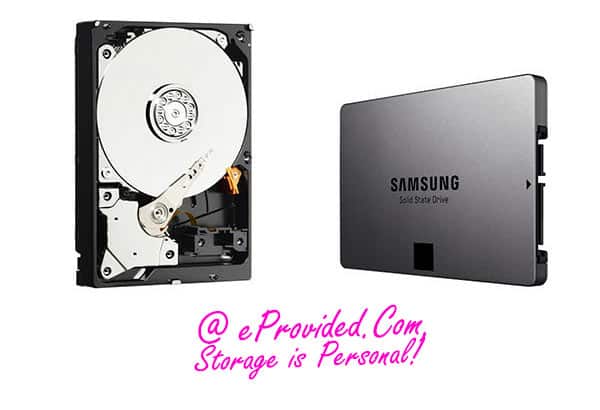
More people are switching from traditional computers to smartphones and tablets for various computing tasks. These newer devices use a different type of drive for data storage, the solid state drive, or SSD. Because of this, many industry experts foretold a substantial drop in hard disk sales. In 2019, 1 TB SSDs were expected to become the mainstream storage drive. Prices on SSDs fell 50–60 percent year over year. For example, the highly sought-after Samsung 970 EVO M.2 NVMe SSD became affordable enough for everyday desktop and laptop upgrades. Solid state drives have no moving parts, so they boot faster, run quieter and survive a drop better than a spinning disk. That same design changes what happens when one fails. Instead of a clicking head or a seized motor, the usual fault is a dead controller or worn-out flash memory, and on most modern drives the data is encrypted by that controller.
December 2019: Solid State Drive Prices Expected to Drop
According to a story by TrendForce, SSD prices per gigabyte were expected to reach an all-time low by the end of 2019. The mainstream market started to include larger SSDs because of the price drops. Once people upgrade to M.2 NVMe SSDs and see the speed, they rarely go back to older hard disks.
The reason for the price swings lower? NAND flash memory vendors were moving to smaller, denser manufacturing technologies. Lower production cost is the cause. This is good for the consumer.
Hard Disk Storage: Still the Least Costly Vs. SSD
Hard drives are still the least expensive type of storage per gigabyte. Many laptop and notebook computers of the time used a hybrid drive, or paired a hard disk with an SSD. This balanced cost against the energy efficiency, durability and performance of an SSD.
SSD Still Too Costly for Some Uses — But Prices Change Fast
An SSD was still too costly for data-intensive uses. Cloud storage, data server farms and virtual servers all still depended on hard disks. This helped keep the hard drive market stable. Other concerns arise when solid state drives fail: eProvided warns that drive failures can become costly with this newer storage technology. Have questions about SSD data recovery? In short, we can help you plan ahead.
However, the iSuppli report indicated that individual use of external hard disk drives was likely to drop. Rather than rely on an external hard drive for extra storage or backup, many people were expected to move to cloud storage and Internet-based backup.
Cost Per Gigabyte to Decrease
Because of lower consumer demand, the cost per gigabyte for hard drives could fall. However, since demand for newer, bigger and more efficient devices is still present, the drop might not be large. Manufacturers keep prices higher to fund research and development of new products.
The fast, large-scale commoditization of PCs, smartphones, tablets and cell phones pushes memory chip (NAND) prices down over time. Improvements in speed over the past decade have been massive. Price declines and growing competition in new storage are good for the consumer.
With a continued decline in hard disk drive use, we can expect SSD manufacturing costs to keep falling. At the time, Toshiba had recently purchased the assets of OCZ Technology. Expect more mergers and acquisitions going forward.
SSD Vs. Hard Disk: Hard Disks See a Drop in Consumer Appeal
As older hard drives near the end of their useful lives, the trend is to replace them with SSDs. But even though the drive itself is wearing out, the data on it is still valuable. If the drive fails before it is replaced, a data recovery specialist can help move the data from the old hard drive to a new SSD. Individuals and companies store irreplaceable information on their current hard drives. The hard drive is replaceable; the data on it is not.
Data Loss and New Technology
Remember that newer technology creates new problems. If you suffer data loss on an SSD or a hard disk, you may find the SSD is harder to tackle. Retrieving lost data from these drives is more difficult because of how the technology works. Contact a lab that specializes in recovering lost images and files if you find yourself in a pinch. With this newer technology, you can learn ahead and have a plan ready, in case disaster strikes.
Here is why SSDs are harder. A hard drive stores data magnetically on platters, and a lab can often repair the mechanics and read the platters. Most modern SSDs encrypt everything they write, and the key is held inside the SSD’s controller chip, not on the memory chips. Pulling the memory chips off a modern SSD returns scrambled data. The workable path is to bring the original controller back to life, so it can decrypt the data itself. That is why a failed SSD should be sent in whole, with nothing removed.
| SSD Vs. Hard Disk Drive, Side by Side | ||
|---|---|---|
| Factor | SSD | Hard Disk Drive |
| Cost per gigabyte | Higher, falling fast in 2019 | Lowest of any drive type |
| Speed | Much faster, especially M.2 NVMe | Slower, limited by spinning platters |
| Where it was used in 2019 | Mainstream PCs, laptops, tablets | Cloud storage, server farms, bulk backup |
| Moving parts | None | Platters, heads and motor |
| Recovery after failure | Harder: the original controller must work | Often possible: repair mechanics, read platters |
What Our Customers Say
Frequently Asked Questions
Recovery Services for SSDs, Hard Drives and Flash
Whichever drive failed, eProvided covers it: the SSD data recovery service for SATA and NVMe drives; professional hard drive data recovery; NAND flash chip-off recovery for USB and card media; USB flash drive data recovery; Memory card data recovery; and microSD card data recovery. Browse all data recovery services →
More SSD Recovery Guides
- How to fix a dead SSD — what to try, and what to avoid.
- What causes solid-state drives to fail
- mSATA 101: the compact SSD form factor
- 2026 SSD technology news & updates
- SSD benefits, pros & cons
- SSD boot speeds vs old hard drives
The 2019 shift put SSDs in most new PCs, and it also changed what recovery looks like when one of them fails. Plan for that before it happens.
SSD or Hard Drive Stopped Working?
Send the whole drive, with nothing removed. Our engineers will check whether the controller or the mechanics can be brought back and tell you what is recoverable, free.
Start My Free Evaluationor call (866) 857-5950 now
Related Recovery Services
Whether your data sits on an SSD or a hard drive, these services cover it: