
Used by NASA · the FBI · the U.S. Navy · Since 1999 · 98% Success Rate
How to Identify Your Micro SD Card’s Class & Speed Rating
- Decode the symbols printed on your card
- SD class 2/4/6/10, U1/U3, V30 & A1/A2 decoded
- Written by a 27-year recovery engineer
- Buying guidance by use case
Look at the back of any SD or microSD card and you’ll see a cluster of small symbols — a number inside a circle, maybe a “U” shape with a digit in it, sometimes a roman numeral. Those symbols are the card’s SD class and speed rating, and they tell you the slowest that card is allowed to write — not how fast it usually runs. A micro SD class works exactly like a full-size SD card class, so this guide reads both. Here’s how to decode the symbols, match a card to what you’re actually shooting, and spot a card that is slower than its label. If a card is throwing errors instead of just running slow, that’s a different problem — see our microSD card data recovery service.
The number inside a circle on your card is its Speed Class (2, 4, 6, or 10 — the guaranteed minimum MB/s). A “U” shape with 1 or 3 inside is the UHS speed class; a roman numeral I or II is the UHS bus type. Class 10 or UHS-I is the minimum for smooth HD video; 4K and burst shooting want UHS-I U3 or UHS-II.
How Can You Tell a Micro SD Card’s Speed Rating?
Read the symbols printed on the card label. A number inside a C marks Speed Class, a number inside a U marks UHS Speed Class, and V30 or similar marks Video Speed Class. Each number is a guaranteed minimum write speed, so Class 10 promises at least 10 MB/s during continuous recording.
“The number on the label is a floor, not a speedometer. Read it that way and you pick the right card.” — Bruce Cullen, founder, eProvided
- What Do Micro SD Card Class and Speed Ratings Mean?
- Micro SD Class Symbol Decoder
- What Speed Class 2/4/6/10 Actually Means
- UHS-I vs UHS-II — What’s the Difference?
- Matching a Card’s Class to Your Use Case
- Why the Rating Is a Minimum, Not an Average
- Read Speed vs. Write Speed
- Why a Card Runs Slower Than Its Class
- Capacity Class vs. Speed Class — SD, SDHC, SDXC & SDUC
- Fake & Counterfeit Cards — What Happens to Your Data
- What Not to Do When a Card Slows Down
- What If the Card Has Actually Failed?
- Real Cards From Our Records
- What Our Customers Say
- Frequently Asked Questions About SD Card Speed Ratings
- Recovery Services for Every Card Failure
What Do Micro SD Card Class and Speed Ratings Mean? How to Read the Symbols on Your Card
Every SD and microSD card prints its speed rating directly on the label — you just need to know which symbol means what. There are four symbol families in use, and a single card can carry more than one at once, since newer standards were added on top of older ones rather than replacing them.
- Number in a circle (2, 4, 6, or 10) — the original Speed Class rating, in MB/s minimum sustained write speed.
- “U” shape with 1 or 3 inside — the UHS Speed Class: U1 guarantees 10 MB/s minimum, U3 guarantees 30 MB/s minimum.
- Roman numeral I or II — the UHS bus interface generation. UHS-II cards have a second row of contacts on the back and need a UHS-II-compatible reader or slot to hit their top speed.
- A small “V” with a number (V6, V10, V30, V60, V90) — the newer Video Speed Class, aimed squarely at 4K and 8K recording.
- A rounded rectangle with “E” and a number (E150, E300, E450, E600) — SD Express Speed Class, the newest standard (added in spec SD 9.1, 2023), built for the PCIe/NVMe-based SD Express bus.
If you see a plain “10” in a circle with no U or V symbol, that’s an older Class 10 card — still fine for most phones and basic HD video, but not built for 4K burst recording the way a U3 or V30 card is.
Micro SD Class Symbol Decoder: Every Label in One Table
This is micro SD card ratings explained in one place. Find the symbol printed on your card in the left column. The other columns name its family, say what the number promises, and show what the camera or reader must support before the card can deliver it. The families come from the SD Association’s speed class standard, which defines Speed Class, UHS Speed Class, Video Speed Class and SD Express Speed Class, and from its separate Application Performance Class page for A1 and A2.
| SD Class Symbols: What Each One Means and What It Needs | |||
|---|---|---|---|
| Symbol on the card | Family | What the number promises | Needs in the host |
| C2, C4, C6, C10 (number inside a C) | Speed Class | At least 2, 4, 6 or 10 MB/s of sustained writing | Class 10 needs the High Speed bus or faster |
| U1, U3 (number inside a U) | UHS Speed Class | At least 10 MB/s (U1) or 30 MB/s (U3) | A UHS bus (SDR50 or DDR50, or faster) |
| V6, V10 | Video Speed Class | At least 6 or 10 MB/s | High Speed or UHS bus |
| V30 | Video Speed Class | At least 30 MB/s, the same floor as U3 | A UHS bus |
| V60, V90 | Video Speed Class | At least 60 or 90 MB/s | UHS-II or UHS-III |
| A1, A2 | Application Performance Class | Quick small reads and writes for apps run from the card, not video speed; A2 adds command queuing and caching | A UHS SDHC or SDXC card; A2 speed only with an A2 host |
| I (UHS-I) | Bus generation | Bus ceiling of 50 MB/s, or 104 MB/s at the top setting | One row of gold contacts |
| II (UHS-II) | Bus generation | Bus ceiling of 156 MB/s full duplex, 312 MB/s half duplex | The second row of contacts |
| III (UHS-III) | Bus generation | Bus ceiling of up to 624 MB/s | The second row of contacts |
| E150, E300, E450, E600 | SD Express Speed Class | At least 150, 300, 450 or 600 MB/s | An SD Express (PCIe and NVMe) host |
The bus rows describe the road, and the class rows describe the guaranteed pace on it; the bus ceilings above come from the SD Association’s bus speed table. One caution applies to every row: a printed symbol is a claim made by whoever made or sold the card. It is not a test result. The counterfeit section below shows how to check one.
What Speed Class 2/4/6/10 Actually Means
The original Speed Class system, the SD card class most cameras still print, has four tiers, each naming its guaranteed minimum sustained write speed in megabytes per second: Class 2 writes at least 2 MB/s, Class 4 at least 4 MB/s, Class 6 at least 6 MB/s, and Class 10 at least 10 MB/s. Class 10 has been the practical floor for years, since anything slower struggles with modern camera files.
These numbers describe the worst case, not the card’s ceiling. A Class 10 card can easily run at 40–90 MB/s in real use — the class rating only promises it won’t drop below 10 MB/s even in a bad moment, which matters for continuous video recording where a stall means a dropped frame.
Class 4 vs Class 6 vs Class 10: Which Do You Need?
Multiply the MB/s figure by eight and you get megabits per second, the unit camera makers use for video bitrates. A Class 4 card guarantees 32 Mbit/s, a Class 6 card guarantees 48 Mbit/s, and a Class 10 card guarantees 80 Mbit/s. That arithmetic is the whole comparison. Class 4 copes with everyday photos and standard-definition clips. Class 6 copes with older 1080p cameras. Class 10 is the lowest SD card class we would buy today, because it is the first one with room above ordinary HD bitrates. None of the three says anything about 4K. If a camera asks for U3 or V30, a Class 10 card is the wrong family and the wrong number. When a card throws errors in the camera instead of recording slowly, our SDHC camera card troubleshooting guide decodes the on-screen messages.
How to Identify a Class 10 SD Card
Look for a 10 inside a C-shaped circle on the label. On a micro SD card the symbol is tiny, and it wears off with use. If the print is gone, you cannot read the micro SD class from the card itself. Check the retail box, the order page, or the model number on the maker’s website, and treat a card you cannot identify as unrated. Do not take the capacity your computer shows as proof, because a counterfeit reports whatever capacity its controller is told to report. To measure real speed, copy one large file onto the card and time it. To test the claimed capacity, use the full-write test in the counterfeit section.
UHS-I vs UHS-II — What’s the Difference?
 Enlarge
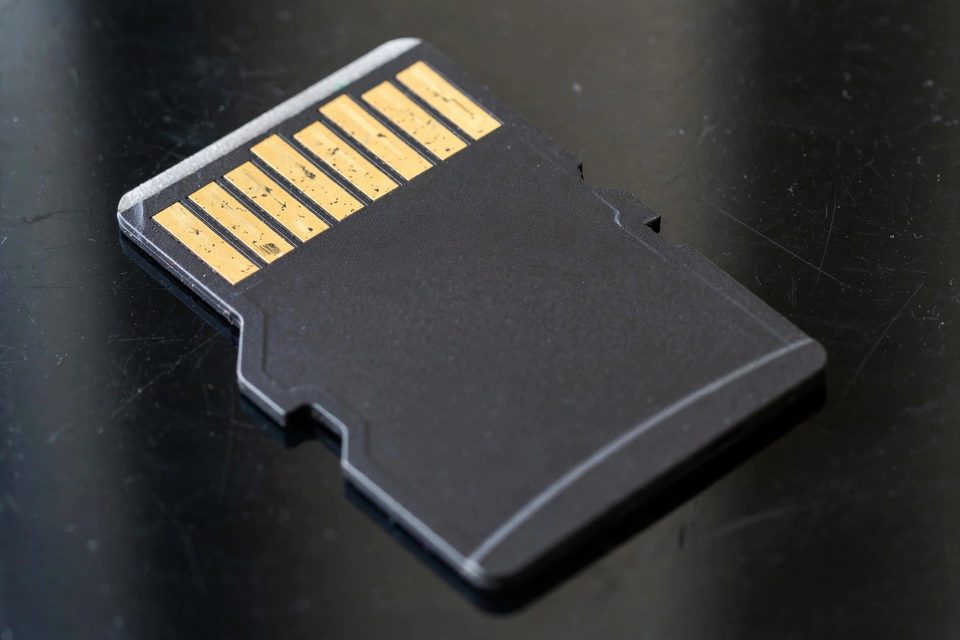
UHS (Ultra High Speed) is a faster bus standard layered on top of the original SD spec, and it comes in two generations. UHS-I uses the same single row of pins as a standard card and tops out around 104 MB/s. UHS-II adds a second row of contacts on the back of the card and can reach 300 MB/s or more — but only in a device and reader that both support UHS-II.
Put a UHS-II card in a UHS-I-only phone or camera and it still works fine — it just runs at UHS-I speed, because the extra contacts sit unused. That’s why matching the card to your device matters as much as matching it to your footage: paying for UHS-II speed you can’t access is money wasted.
You can tell the two generations apart without any app or label: turn the card over. A UHS-I card shows a single row of gold contacts, while a UHS-II card shows a second row beside it, as in the photo. The Roman numeral printed on the label should agree with what you see, and it is worth checking both, because some retail listings print the capacity and the class but leave the bus generation out.
The SD Association publishes the bus ceilings: UHS-I reaches 104 MB/s on one row of pins, UHS-II reaches 156 MB/s full duplex and 312 MB/s half duplex on the second row, and UHS-III reaches 624 MB/s. Those are limits of the bus, not promises from the card. The printed class says what the card guarantees, and the bus says how fast the road is. A UHS-II card in an old USB 2.0 reader hits a different wall: USB 2.0 tops out at 480 Mbit/s, or 60 MB/s, before any overhead. To compare the physical card types themselves, see our guide to the different types of memory storage cards.
| SD & MicroSD Speed Ratings — Every Symbol, Speed & What It Means for Recovery | ||||
|---|---|---|---|---|
| Rating / symbol on the card | Guaranteed minimum write | Best use case | 4K/8K ready? | Data recovery relevance |
| Class 2 (2 in a circle) | 2 MB/s | Standard-definition video, basic file storage | ⚠ No | Same NAND-based recovery approach as every other class — speed rating has no bearing on whether a failed card can be recovered. |
| Class 4 (4 in a circle) | 4 MB/s | Casual photos, 720p video | ⚠ No | Recovery method is identical regardless of class — the rating only ever describes write speed, never durability. |
| Class 6 (6 in a circle) | 6 MB/s | 1080p HD video (entry level) | ⚠ No | No difference in recovery approach vs. higher classes — the NAND die is read the same way once the card fails. |
| Class 10 (10 in a circle) | 10 MB/s | Full-HD video, burst-mode photos | ⚠ Borderline | The most common class in our recovery queue simply because it’s the most widely sold — not because it fails more often. |
| UHS-I U1 (1 in a U) | 10 MB/s | Full-HD video on UHS hardware | ⚠ Borderline | UHS bus speed has no effect on chip-off recovery — we read the raw NAND die directly, bypassing the bus entirely. |
| UHS-I U3 (3 in a U) | 30 MB/s | 4K video, action cameras, drones | ✓ Yes | Same chip-off process as any other tier; higher-speed controllers don’t change how the underlying flash is recovered. |
| UHS-II (roman numeral II) | 30+ MB/s (faster bus) | Professional 4K/8K, rapid burst shooting | ✓ Yes | The extra row of contacts is a bus feature only — once removed for chip-off, a UHS-II card is read like any other. |
| V6 (Video Speed Class) | 6 MB/s | Basic HD video (older cards, alt. to Class 6) | ⚠ No | Same recovery approach as Class 6 — V-rated and Class-rated cards use identical NAND, just a newer printed symbol. |
| V10 (Video Speed Class) | 10 MB/s | Full-HD video (alt. to Class 10/U1) | ⚠ Borderline | No recovery difference from Class 10/U1 — V10 is the same guaranteed speed under a different label. |
| V30 (Video Speed Class) | 30 MB/s | 4K video, drone and action-cam footage | ✓ Yes | Equivalent to U3 for recovery purposes — same 30 MB/s NAND, same chip-off method when it fails. |
| V60 (Video Speed Class) | 60 MB/s | 8K and high-frame-rate 4K (needs UHS-II bus) | ✓ Yes | Higher-end controller, but the same principle applies: bus speed dies with the card, the NAND die doesn’t. |
| V90 (Video Speed Class) | 90 MB/s | Professional cinema-grade 8K workflows | ✓ Yes | The highest Video Speed Class currently defined — still recovered via standard chip-off/monolith extraction. |
| E150 (SD Express) | 150 MB/s | High-volume RAW burst photography | ✓ Yes | SD Express requires a PCIe/NVMe-based bus — newer controller architecture, but the same NAND-recovery principles apply. |
| E300 (SD Express) | 300 MB/s | High-speed continuous burst + video | ✓ Yes | Same SD Express architecture as E150, just a faster guaranteed floor. |
| E450 (SD Express) | 450 MB/s | Large-scale video processing, real-time capture | ✓ Yes | SD Express cards are new enough that few failed units have reached our lab yet — the same die-level extraction principles are expected to apply. |
| E600 (SD Express) | 600 MB/s | Professional cinema, software execution from card | ✓ Yes | The fastest SD standard defined to date (SD 9.1, 2023) — too new for long-term failure data, but built on the same flash-memory foundation every recovery method targets. |
Matching a Card’s Class to Your Use Case
 Enlarge
The fastest, biggest-capacity card on the shelf isn’t automatically the right one — match the speed class to what you’re actually recording. Capacity and speed class are two separate specs, and a huge card with a low speed class will still choke during continuous 4K recording or rapid burst photography.
- Basic photos & casual phone use: Class 4 or Class 10 is plenty — standard photo files write in well under a second regardless.
- 1080p / HD video: Class 10 or UHS-I U1 (10 MB/s minimum) handles smooth continuous recording.
- 4K video: UHS-I U3 or V30 (30 MB/s minimum) is the realistic floor; many camera manuals require it outright.
- 4K60 / 8K & high-bitrate video: V60 or V90 rated cards, usually paired with UHS-II hardware.
- Burst-mode continuous shooting: U3 or faster — a slow card forces the camera’s buffer to fill and stalls the burst mid-sequence.
Dash cams and security cameras deserve a special note: they write continuously for hours, which is a harder endurance test than the write-speed rating alone. Look for cards explicitly rated for “high endurance” or continuous recording, not just a high speed class. Major card makers — SanDisk, Samsung, Lexar, and Kingston — all print these ratings the same standardized way, so the symbols mean the same thing regardless of brand. Cards that record around the clock also wear faster, so these tips for extending a flash memory card’s life matter most in a dash cam.
Match the Symbol Family, Not Only the Number
Most buyers miss this rule. The SD Association says to pick a card with the same symbol the host device lists, or a higher number in that same family. A host that asks for UHS Speed Class 1 works with a U1 or a U3 card. A host that asks for Class 10 does not get its guaranteed speed from a U1 card, and a host that asks for U1 does not get it from a V10 card, even though all of them promise 10 MB/s. The association says the expected write speed is not assured when the families differ. So when a manual says V30, buy V30 or V60. When it says U3, buy U3.
Bitrate Math: Which Class Clears Your Camera?
Camera menus state video quality in megabits per second (Mbit/s). The card label states megabytes per second (MB/s). Divide the bitrate by eight, then compare the result with the guaranteed minimum. Leave some headroom, because the camera also writes audio and file data, and the class is measured on clean, unfragmented space.
| Camera Bitrate to Card Class | ||
|---|---|---|
| Camera bitrate | Sustained write needed | Smallest class that clears it |
| 24 Mbit/s | 3 MB/s | Class 4, or anything higher |
| 50 Mbit/s | 6.25 MB/s | Class 10, U1 or V10 (Class 6 falls just short) |
| 100 Mbit/s | 12.5 MB/s | U3 or V30 (Class 10 sits under it) |
| 200 Mbit/s | 25 MB/s | U3 or V30, with thin headroom |
| 400 Mbit/s | 50 MB/s | V60 |
| 600 Mbit/s | 75 MB/s | V90 |
Action cameras, drones and dash cams all follow this arithmetic, but their menus and manuals differ by model, so the manual wins. Phones are a separate case. The Application Performance Class exists for people who run apps from the card, for example when a phone has too little internal memory. If the card only holds photos and video, the speed class matters and A1 or A2 does not.
Why the Rating Is a Minimum, Not an Average
 Enlarge
Every class and UHS symbol on a card describes a guaranteed floor, never an average or a peak. Manufacturers test to the worst realistic case — random small writes, a nearly full card, warm operating temperature — and the printed number is what survives that stress test. Real-world sequential speed is almost always higher. A U3 card might write at 80 MB/s on a good day, but the label only promises that it will never fall below 30 MB/s, much like a road with a posted minimum rather than a top speed.
That gap is exactly why two cards with the same class rating can feel different in daily use: one might average well above its floor, another might barely clear it. If your card seems slow for its class, that alone doesn’t mean anything is wrong — it's still meeting its guarantee. It's a separate question from whether the card has actually failed.
Read Speed vs. Write Speed
Every class, U, V, and E rating on this page describes guaranteed minimum write speed — not the big number printed on the packaging. Retail boxes almost always advertise read speed instead (“up to 170MB/s!”), because it’s the larger, more marketable figure. Read speed matters for offloading footage to a computer; write speed is what your camera or phone depends on while it’s actually recording.
This is the single most common point of confusion when buying a card. A card can legitimately advertise 170 MB/s read while only carrying a U1 (10 MB/s minimum write) rating — both numbers are true, they just measure different directions of data flow. If a camera manual specifies “requires V30,” checking only the read-speed number on the packaging won’t tell you whether the card actually qualifies; look specifically for the class/U/V/E symbol itself.
Write speed also has two shapes. Sequential writing is one long file, such as a video, and that is what the Speed, UHS, Video and Express classes measure. Random writing is many small reads and writes at once, which is how an app behaves, and that is what A1 and A2 measure, counted in operations per second. A card can be excellent at one shape and ordinary at the other. That is why SD card write speed has no single number.
Why a Card Runs Slower Than Its Class Rating
A card that misses its class in daily use almost always has one of four ordinary causes. Each one is cheap to check before you blame the card.
- Fragmented or nearly full space. The SD Association defines Speed Class on sequential writes to a completely unfragmented area. Repeated deleting and writing scatters the free space, so a card with room left can still miss its class. The association’s own fix is to move the data to another storage device and re-format the card.
- A slower reader or slot. A UHS-I slot or a USB 2.0 reader caps a UHS-II card, as described above.
- A mismatched symbol family. A Class 10 host with a U1 card does not assure the speed, even though both say 10 MB/s.
- A label that is not true. See the counterfeit section below.
Copy everything off the card before you format anything. A format rebuilds the table that points to your files, so format after the copy, in the device that will use the card. If the copy itself fails or the card starts throwing errors, read our memory card data recovery basics before you try anything else. The fragmentation details are on the SD Association speed class page linked above.
Capacity Class vs. Speed Class — SD, SDHC, SDXC & SDUC
A card’s storage capacity and its write-speed rating are two completely independent specifications, even though buyers frequently assume a bigger card is automatically a faster one. Capacity is labeled separately: SD (up to 2GB), SDHC (2GB–32GB), SDXC (32GB–2TB), and SDUC (2TB–128TB). A card can be SDXC-capacity and still carry only a Class 4 speed rating, or SDHC-capacity with a V90 rating — the two labels combine independently.
This matters at the point of purchase: a 512GB card is not a faster card just because it holds more data. Always check the capacity letters (SDHC/SDXC/SDUC) AND the speed symbol (circle/U/V/E) separately — a high-capacity, low-speed-class card will still stutter recording 4K video no matter how much room is left on it. Some older cameras also cannot read the larger capacity classes at all, so check the camera manual for the largest card it accepts.
Fake & Counterfeit Cards — What Happens to Your Data
 Enlarge
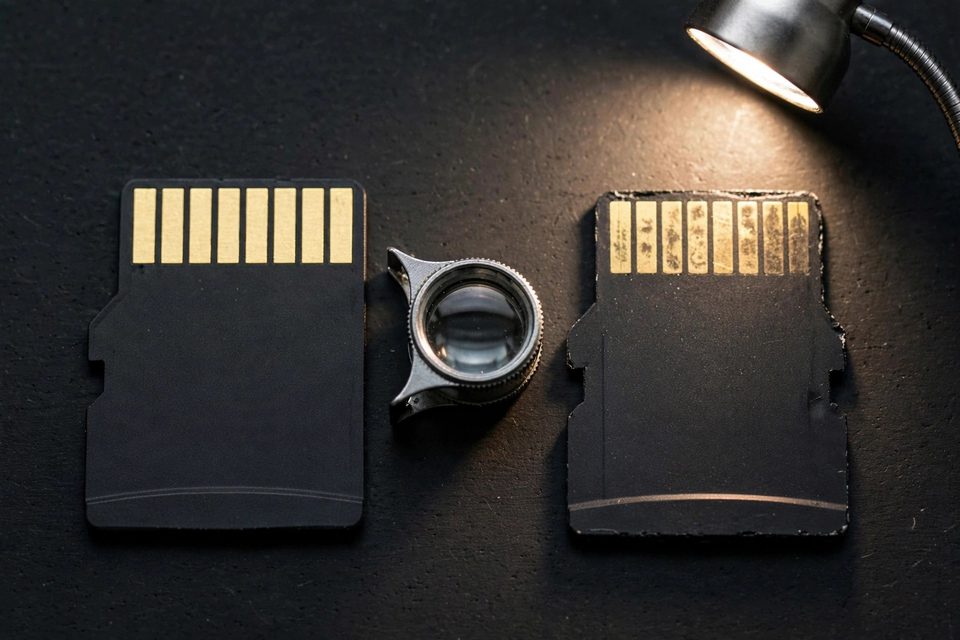
A counterfeit card has a reprogrammed controller reporting a false capacity — it might claim 256GB while only holding a fraction of that in real NAND flash. It looks completely normal (correct capacity shown, files save fine) until the real physical limit is reached, at which point it silently overwrites your earliest files instead of throwing an error. Warning signs: an unusually low price, blurry packaging, no serial number, or an unauthorized third-party seller. The only reliable check is a full-write-and-verify test — H2testw (Windows) or F3 (Mac/Linux) writes data across the entire claimed capacity and reports exactly where real storage ends.
This is a genuinely different failure mode from a legitimately broken card: the NAND that exists usually still works, but files corrupt or vanish silently once the real ceiling is crossed. If you suspect a card is counterfeit and files are already missing, stop writing to it immediately — every new file risks overwriting data still sitting in the card’s real, smaller-than-advertised capacity. If this has already happened to you, our lab regularly recovers files from cards affected by counterfeit-controller overwrite — start a free evaluation or call (866) 857-5950, and we’ll tell you what’s still there before you do anything else.
What NOT to Do When a Card Slows Down or Throws Write Errors
A slow or erroring card is a warning, and the first hour decides whether the files stay readable. Five habits make it worse:
- Do not keep shooting on it. Every new file can overwrite space where earlier files still sit, especially on a fake-capacity card that wraps around once its real limit is reached.
- Do not format it to fix the speed. A format rebuilds the table that points to your files. Copy everything off first, and format afterwards in the device that will use the card.
- Do not run free repair tools or disk-check commands on your only copy. They rewrite the file system on the card itself. The GoPro customer below tried free repair tools first, and they did not work.
- Do not run H2testw or F3 on a card that holds files you need. Both write test files across the free space, and on a fake-capacity card those writes can wrap around and overwrite the earliest files. Copy your files to another drive first.
- Do not pull the card while the camera is writing. A card removed before the device shuts down can lose the update to its file table. One dash cam customer below suspected exactly that.
If the card already shows errors or will not mount, stop using it and read our broken SD card recovery guide for what happens next.
What If the Card Has Actually Failed?
A card that runs slower than expected or shows an uncertain rating is not the same problem as a card that has actually failed — corrupted, unreadable, cracked, or no longer recognized by any device. If you’re just trying to decode the speed symbols, nothing here needs fixing. If the card genuinely won’t mount or is throwing errors, stop using it immediately; every additional write risks overwriting data that could still be recovered.
For a card that’s physically damaged — snapped, cracked, or crushed — see our guide on recovering an SD card broken in half. For any failed microSD card, our lab offers dedicated recovery using chip-off and direct NAND extraction — even snapped and severely corrupted cards are often recoverable. Heat, water and bending also kill cards, and our list of five things that damage media cards shows what to avoid. The same lab also handles failed SSDs from Samsung, Crucial, Western Digital, Seagate, and Toshiba, plus retired formats like Sony’s Memory Stick and old CompactFlash cards still holding decades-old photo archives. Our team can evaluate it free, or call (866) 857-5950 to talk it through — No Data, No Data Recovery Fee, since 1999.
About eProvided — Data Recovery Specialists Since 1999: our data recovery lab has spent over 27 years reading the minimum write speed a card was rated for against what it actually does under a microscope, and recovering the ones that stop working altogether.
Real Cards From Our Records: Labels, Cameras and Dash Cams
A printed rating tells you what a card should do. These cases show what happens when a card stops doing it. Where we have the customer’s own words from our online form, we quote them. Names and contact details are removed. Some of these cards came back and some did not, and we tell each one as it happened. Counterfeit cards turn up in our records only now and then, so this page does not claim a pattern.
A 1 TB card with every rating on the label, January 2024
The customer described the card as a 1 TB micro SD card with A1, U3, Class 10 and V30 printed on its listing. They wrote:
“I inserted this in my phone and then moved about 7 GB of photos from internal storage to the SD card. Within one hour, the phone would no longer recognize the card and the photos are not accessible.”
We cannot tell from the form whether the card was genuine, and we do not say it was fake. The lesson is the one from the decoder table: every rating on that label was a claim. Our record shows the lab had a success recovering the data.
GoPro card with a video that would not play, April 2024
The GoPro owner described the problem in the form like this:
“Recorded 20 min video on GoPro Hero. There is 1GB of data on the SD card but it can’t be transferred to a computer or played on the GoPro. Tried free online repair tools and didn’t work.”
Our record shows basic recovery failed and advanced recovery was needed. The lab then had a success recovering the data. A card that holds data but will not copy or play is a failed card, not a slow one, and a faster speed class would not have changed that.
Dash cam card pulled before the camera shut down, May 2026
The dash cam owner put the cause in the form:
“My 64GB MicroSD may have been corrupted from pulling the drive out of my dashcam before properly shutting down the device.”
Our record shows the basic recovery failed, the customer chose advanced recovery, and the lab then successfully recovered the data. Pulling a card while a camera is still writing is one of the easiest ways to damage the file table.
Dash cam video that would not open, April 2024 (not recovered)
Not every card comes back to the customer. This person wrote:
“I can find a video from dash cam memory card. I have the file I send to my phone but it doesn’t open.”
Our record shows the customer declined the quote and picked up the card. We list it because declining a quote is a real outcome, and we do not hide the cases that ended that way. If a video arrives on your phone but will not open, our guide to corrupted MP4 and MOV files explains what is wrong with the file.
“Purchased a counterfeit card,” December 2025
“Purchased a counterfeit card that corrupted data.”
That one line is all the customer wrote, and our record holds only the form, so we have no outcome to report. It is a fair picture of the risk, though: a fake card can corrupt data without warning, which is why the full-write test in the counterfeit section is worth running on a new card before you trust it.
What Our Customers Say
Frequently Asked Questions About SD Card Speed Ratings
Recovery Services for Every Card Failure
If your card is unreadable, cracked, or the wrong speed class isn't the problem — it has actually failed — these are the services that get the data back: