
Used by NASA · the FBI · the U.S. Navy · Since 1999
Broken SD Card Data Recovery — Snapped, Cracked or Broken in Half
- No Data, No Data Recovery Fee
- Free, confidential evaluation
- 4.9 / 5 on Trustpilot (67 reviews)
- Worldwide lab recovery
A micro SD card broken in half looks like a total loss — it almost never is. Your photos, videos, and files are stored on a tiny NAND flash die sealed in epoxy near the card’s gold contacts, and that die usually survives the snap intact. The plastic body, the exposed traces, and the contacts take the damage; the data does not wash out with them. The two rules are simple: do not plug a snapped card into anything, and get it to a professional who can read the NAND chip directly. At eProvided we recover data from physically broken microSD cards every single week.
We’ve been recovering data from snapped, cracked, and shattered memory cards since 1999, averaging a 98% success rate across all device types — work used by NASA when storage fails under conditions no one gets a second try at. We bring that same chip-level precision to a microSD card snapped in half during a wedding shoot, pulled in two out of a drone, or cracked inside a phone. If it ever stored photos and now it’s in pieces, we can evaluate it — free. Start your case now or call (866) 857-5950.
This guide covers what’s actually inside a microSD card, why a card snapped in half rarely means lost data, how chip-off and monolith recovery read the raw NAND die, the difference between a crack, a bend, and a clean snap, and exactly what to do (and never do) with the broken pieces. Need the full service overview instead? See our micro SD card data recovery service. One warning up front: every time you plug a broken card in to “test” it, you risk shorting the NAND and losing everything.
- What’s Inside a microSD Card
- Is the Data Gone When It Snaps?
- Why microSD Cards Snap in Half
- What Never to Do With the Pieces
- How Chip-Off Recovery Works
- Cracks vs. Bends vs. Clean Snaps
- Unrecognized & Corrupted Cards
- microSD in Android & iOS Phones
- Customer Reviews
- Frequently Asked Questions
- More Recovery Help for Every Device
What’s Actually Inside a microSD Card?
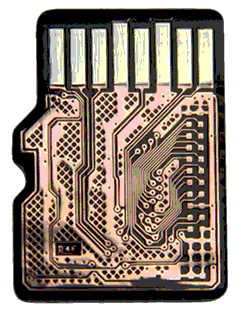
To understand why a snapped card is recoverable, you have to know what you’re holding. A microSD card is mostly empty plastic. The part that matters is tiny: a NAND flash memory die where your data physically lives, and a controller chip that translates between the card and your device. On almost all modern microSD cards these two are fused into a single sealed package — a monolith — with the silicon, wiring, and contacts encased in one block of hardened epoxy.
That NAND die is tiny — the memory wafers inside measure a fraction of an inch across, which is how a card the size of a fingernail now holds a terabyte. Your data is stored as trapped electrical charge inside microscopic floating-gate transistors, sealed deep in the package. When a card snaps, the break almost always runs through the plastic body and the exposed traces near the contacts — not through the die itself, which sits clustered toward one end of the card under the epoxy. That physical fact is the whole reason recovery is so often possible.
This matters because there is no “repair” for a snapped microSD the way there is for a phone screen. You cannot glue the halves together and read it — the hair-width traces are severed. A professional instead bypasses the broken card and reads the surviving NAND die at the raw chip level. Knowing the card is a monolith, not a tidy chip-on-a-board, also tells our engineers which recovery path the case needs the moment it arrives.
A snapped card looking shattered tells you almost nothing about your data. We routinely complete full recoveries on cards that came in as two separate pieces in a bag — because the NAND die in the larger half was never touched by the break. A clean visible crack across the body is a damaged card, not damaged data.
Is My Data Gone When a Micro SD Card Snaps in Half?
No — in some cases the data is still fully recoverable. When a microSD card breaks in half, the snap severs the internal traces and ruins the card as a working device, but the NAND flash die that holds your photos and files could survive the break intact. The card is dead; the data is not. The job is to read that surviving die directly, which is exactly what professional chip-off and monolith recovery does.
For an engineer, “the card is broken” and “the data is lost” are two different statements. A microSD card snapped in half will never be recognized by a reader again — that’s expected and irrelevant. What matters is the condition of the die under the epoxy. In our experience, the large majority of physically broken microSD cards brought to professionals before anyone forced or powered them still yield a complete recovery. That’s the whole premise of broken micro SD card recovery: a physically broken micro SD card is a hardware problem, not lost data. The hard cases are the ones someone plugged in repeatedly, heated, or tried to solder at home.
The single biggest variable you control is restraint. A snapped card left alone and sent to a lab is a routine recovery; the same card after three attempts to wedge it into a reader — shorting the contacts each time — may have a cooked die and no recovery at all. If your card is broken in half, the most valuable thing you can do is stop and get a free evaluation before you touch it again.
Micro SD Card Snapped in Half? The Data Is Almost Certainly Still There.
Our engineers will tell you exactly which photos, videos, and files we can pull off the NAND chip — free, no obligation, completely confidential.
Start My Free Broken-microSD Recovery Evaluationor call (866) 857-5950 now
Why Do Micro SD Cards Snap in Half?
microSD cards feel sturdy, but they’re thin slivers of plastic over fragile silicon — far less durable than they look. Most snaps trace back to a handful of everyday causes, and recognizing yours helps our engineers anticipate exactly where the break ran.
The most common culprit is forcing a card into the wrong slot or the wrong way. Card readers vary widely — many have separate microSD, full-size SD, and CompactFlash slots — and shoving a microSD into a slot that’s too small, or jamming it in backward, applies a sharp bending load right across the body. Push hard enough and it snaps clean in two. The second culprit is the microSD-to-SD adapter: misaligning the tiny card inside the adapter shell, then forcing the assembly, levers the card and cracks or breaks it. Always align gently and follow the slot’s keying — never force.
The rest come down to ordinary mishaps: a card left loose in a pocket and sat on, dropped and stepped on, yanked out under load, or fatigued from being swapped between bodies hundreds of times on a shoot. Cheap or counterfeit cards snap far more easily than name brands. Whatever the cause, the outcome is the same — a broken card and a surviving die — and the recovery approach doesn’t change. Nothing about it can be fixed after the fact, so the only move is to stop using it and get the broken card evaluated.
What Should You Never Do With a Broken microSD Card?
The damage you can’t undo almost always comes after the card breaks, not during. Here is exactly what to avoid the moment you’re holding a snapped or cracked microSD — the same mistakes our engineers see turn a routine recovery into a lost cause.
Never Plug a Broken Card Into a Reader
This is the big one. Plugging a microSD card broken in half into a reader bridges the severed traces and exposed contacts and causes a short. The card heats up — sometimes hot to the touch within seconds — and that heat damages the very NAND die we need to read. If a card ever feels hot, stop instantly; the internal wiring and the hair-width fuses inside are being destroyed. One “just checking if it works” insertion is the most common way a recoverable card becomes unrecoverable.
Never Run File-Recovery Software on It
DIY off-the-shelf file-recovery apps cannot help a physically broken card — software needs the card to mount and be readable, which a snapped card never will. Worse, to run any software you first have to plug the card in, which triggers the short above. Software recovery is for logical problems on a working card, not a card in two pieces. There is no app for a snapped microSD.
Never Try to Solder, Glue, or Open It Yourself
Don’t glue the halves together, don’t scrape at the contacts, and don’t try to solder anything — the traces are thinner than a human hair and a home iron destroys the die. A snapped or bent microSD leaves zero room for DIY; every attempt narrows your odds. Place the pieces in a small protective container, keep them dry and undisturbed, and open a free recovery case or call (866) 857-5950. Let the lab do the heavy lifting.
How We Recover Data From a Broken microSD — Chip-Off & Monolith

Recovering a broken microSD isn’t a software download — it’s a methodical, chip-level process performed by engineers who do this every week. Because nearly all microSD cards are monoliths, the work happens at the substrate level: we don’t lift a chip off a board, we expose and tap the NAND die inside the sealed epoxy package itself. We recover broken microSD cards from every major maker — SanDisk, Samsung, PNY, Toshiba, Western Digital, Seagate, Lexar, and Kingston — and the same chip-off approach handles the older card formats too, right down to a legacy Memory Stick. Here’s how a snapped-card case moves through our lab.
- Free evaluation — ship the pieces. Start on our recovery intake page; it takes about a minute and you pay nothing upfront. Pack both halves in bubble wrap so they can’t rattle; our Las Vegas lab logs the card on arrival.
- Microscope inspection. Every broken card goes under a stereo microscope first — the only way to see where the snap or crack ran, whether it crossed the die, and whether the break separated the shell from the NAND.
- Map the package — chip-off or monolith. For a card with a separable chip, we perform a classic chip-off; for a true monolith, we grind to the substrate and locate the die’s test pads. Either bypasses the broken card entirely.
- Tap the raw NAND die. With precision rework gear we connect directly to the die’s contacts — reconstructing severed traces where the snap cut them — and read the raw flash with professional NAND readers.
- Reassemble the data. Raw NAND is scrambled by the controller’s wear-leveling and ECC. We reverse that translation in software to rebuild the file system, then extract and verify your photos, videos, and documents.
- Secure delivery. Recovered files ship back on a USB drive or via encrypted transfer. You confirm what was recovered before the case closes. No Data, No Data Recovery Fee.
This is the same fundamental approach behind all chip-level NAND recovery, and it works even when the card is in two separate pieces. According to NIST forensics guidelines, chip-off is a recognized, validated method for extracting data from non-functional flash media — the same technique used in law-enforcement digital forensics. None of it exists at a phone shop or electronics store. The table below shows why DIY and chip-off recovery aren’t the same thing — and why one of them risks your only copy.
| DIY Attempt vs. Professional Chip-Off Recovery | ||
|---|---|---|
| Approach | What It Actually Does to a Snapped Card | Result |
| Plug it in to “test” | Bridges severed traces and shorts the card; heat builds in seconds and can cook the NAND die — the one part still holding your data. | ⚠ Destroys the Chip |
| Recovery software / glue / solder | Software can’t mount a broken card; glue and a home iron contaminate the package and burn traces thinner than a hair. | ⚠ No Path Forward |
| Professional chip-off / monolith | Bypasses the broken card entirely, taps the raw NAND die under magnification, and rebuilds the file system in software. | ✓ Reads the Data Directly |
Questions before you start? Click to chat live with our specialists right now.
Cracked, Bent, or Snapped in Half — Does It Change Your Odds?
Yes — the type of physical damage shifts the difficulty, though rarely to zero. A crack, a bend, and a clean snap each stress the card differently, and where the damage falls relative to the NAND die is what really decides the case. Here’s a quick reference for the most common break types.
| Break Type vs. Recovery Outlook for a microSD Card | ||
|---|---|---|
| Damage Type | What Actually Happened | Recovery Outlook |
| Bent (not yet snapped) | A bend can dislocate the hair-width traces inside the board without breaking the die. Often the best-case physical damage — stop bending it and ship it before it cracks through. | ✓ Best Odds |
| Cracked (hairline or surface) | Cracks disrupt the silica structure that stores and accesses data; the location is everything. A crack away from the die is very recoverable — one crossing it is harder. A microscope is required to judge severity. | ✓ Usually Good |
| Snapped clean in half | The card is dead as a device, but the die clusters toward one end — so a clean snap could leave the NAND intact. We read the data directly via chip-off / monolith. | ⚠ Depends, Must See in Lab |
| Shorted / overheated after the break | Plugged in repeatedly after snapping, or heated by a short. This is the one that can cook the die. Recoverable if caught early — far harder once the NAND itself is burned. | ⚠ Act Fast |
The takeaway: a bend buys you the most room, a snap is questionable, and damage caused by burns truly threaten your data. A bent micro SD card that hasn’t cracked in a particular area is often an easier case to manage — so stop flexing it and ship it. For a bent or cracked card specifically, our damaged microSD card guide goes deeper; full-size cards are covered in our broken SD card recovery guide.
My microSD Won’t Read or Is Corrupted — Same Problem?
Not always — but the response is the same: stop using it. A card that snapped is obviously broken, but plenty of failing microSDs show up as an unrecognized SD card — “not recognized,” “corrupted,” or simply dead with no visible damage at all. Sometimes that’s an internal crack or a hairline bend you can’t see; sometimes it’s the NAND wearing out or the controller failing. Either way, the moment a card stops being recognized or starts corrupting files, every additional read or write attempt risks making it worse.
If your microSD won’t respond and you’re sure the reader and slot are correct, don’t keep retrying it in different devices — each attempt can short a cracked card or overwrite recoverable data on a corrupting one. The same is true for a card that suddenly throws “please format” errors: do not format it. Set it aside and let a professional determine whether the failure is physical, logical, or both. We open every case with a free evaluation precisely so you find out before risking the card — start one here the moment your card stops reading.
Snapped, Cracked, or Just Won’t Read? We’ll Tell You What’s Recoverable — Free.
Send us the pieces — our engineers read the raw NAND die directly and tell you exactly what we can pull off before any work begins.
Start My Free Recovery Evaluationor call (866) 857-5950 now
Broken microSD in Android & iOS Phones

Plenty of people don’t realize a removable microSD card is sitting inside their phone until it fails. On most Android phones the card lives in the SIM tray or a dedicated slot, holding photos, videos, and files that aren’t in the cloud. When it cracks or snaps — often while swapping it between devices or after a drop — the phone may report missing photos or refuse to mount external storage, and the owner often has no idea a tiny card is the culprit. A note on Apple: iPhones do not have a microSD slot, so an iPhone’s photos live on internal NAND — if your iPhone is the problem, that’s a phone recovery, not a card recovery.
If your Android phone fails and you suspect the card, power it down and remove the microSD carefully — some models need the back or tray opened to slide it out. If it comes out cracked or in pieces, do not reinsert it to “test,” for the short-circuit reasons above. The card recovers independently of the phone: we read its NAND die directly regardless of which handset it came from. Bag the pieces, keep them dry, and start a free evaluation — the phone can be replaced, but the photos on that card usually can’t.
What Our Customers Say
Frequently Asked Questions
Don’t Risk the Chip — Stop and Get a Free Evaluation.
A snapped microSD is routine for us. Send us the pieces and our engineers will tell you exactly what we can recover off the NAND die — free, no obligation, completely confidential.
Start My Free Broken-microSD Recovery Evaluationor call (866) 857-5950 now
More Recovery Help for Every Device
A snapped microSD isn't the only thing we bring back — here's where to start if the failure hit a different device, plus related guides: