
Used by NASA · the FBI · the U.S. Navy · Since 1999
NAND Flash Not Detected? What It Means — and Who to Call to Get Your Files Back
- No Data, No Data Recovery Fee
- Controller failure vs. bad NAND die, explained
- Written by a 27-year recovery engineer
- Chip-off & monolith NAND recovery in-house
Your SSD, USB drive, SD card, or phone suddenly stops showing up at all — the device is not recognized, no drive letter, no capacity, nothing but silence where your files used to be. Underneath almost every one of those devices sits the same component: NAND flash memory. When it “disappears,” the instinct is to assume the memory itself burned out and everything on it is gone. After 27+ years of NAND flash not detected cases in our lab, that assumption is wrong far more often than it’s right. This guide explains what actually happens when NAND flash stops being detected, how to tell a failed controller from failed memory, what to avoid doing next, and who to call for NAND flash data recovery when it’s time for a professional — the same controller-plus-NAND failure shows up on a failed SSD as it does on any other NAND-based device.
“NAND flash not detected” almost always means the controller chip that talks to your computer has failed — not that the NAND memory holding your files has been erased. Controller failure, firmware corruption, and physical/electrical damage account for most cases, and on unencrypted media (USB drives, SD and microSD cards, monolithic chips) the data can usually be read directly off the NAND chips in a lab, bypassing the broken part entirely. Modern SSDs and phones encrypt their NAND, so they need their original controller or processor brought back to life instead.
What Does NAND Flash Not Detected Mean for Your Files?
Usually, the files are still there. NAND flash not detected means the controller, firmware, or electrical path failed, while the memory chips keep their contents without power. The fix depends on the device: chip-off suits USB drives and SD cards, but modern SSDs and phones need their original controller or processor revived. We have done this since 1999.
“Not detected points at the gatekeeper, not the vault. The chip behind it rarely forgets.” — Bruce Cullen, founder, eProvided
Do RIGHT NOW
- Stop using the device the moment it goes undetected
- Try it once on a second computer or port, then stop
- Note any smell, heat, or clicking — write it down
- Set the device aside exactly as it is
DON’T Do
- Don’t keep replugging or power-cycling it
- Don’t run repair or format tools on an undetected device
- Don’t attempt a firmware update or controller swap yourself
- Don’t open the case or apply heat to “dry it out”
Worried about specific files on a device with undetected NAND flash? Before trying anything else, you can check if your files are recoverable »
- What Happens When NAND Flash Is Not Detected?
- Common Causes of NAND Flash Failure
- Controller Failure vs. a Bad NAND Die
- Which Devices This Affects — SSDs, USB Drives, SD Cards & Phones
- NAND Flash Myths — What’s True and What Isn’t
- NAND Flash Not Detected: What to Do Next
- Who to Call: What Happens During Professional NAND Recovery
- How to Prevent NAND Flash Failures
- What Our Customers Say
- Frequently Asked Questions
- Recover Data from Undetected NAND Flash
- Related Recovery Services
What Happens When NAND Flash Is Not Detected?
NAND flash memory is the chip that physically stores your files — it sits inside SSDs, USB flash drives, SD and microSD cards, and the internal storage of every smartphone. It never stands alone: a small controller chip sits between the NAND and your computer, translating requests, tracking wear-leveling, and reporting the drive’s identity. “NAND flash not detected” means that conversation broke down — the operating system asked the device to identify itself and got silence, a garbled answer, or nothing at all.

The critical distinction: the NAND memory chips themselves are usually undamaged. They hold their contents without power, the same way they did the day they were manufactured. What fails is almost always the layer in front of them — the controller, the firmware, or the electrical path that lets your computer reach the chip at all. That distinction is the difference between “my data is gone” and “my data is sitting right there, just behind a broken door.” How that door gets opened depends on the device. On a USB flash drive, an SD card, or a microSD card, the memory is not locked to its controller, so reading the chip directly on lab hardware is a sound path when the controller is dead. On modern SSDs and on phones with built-in encryption, the key that unscrambles the data lives in the controller or processor, not in the memory chip, so a direct chip read returns only scrambled bytes; there the work is reviving the original controller on an SSD, or, on a phone, repairing the original board or moving the processor and memory together onto a donor board, so the original silicon can decrypt again. Knowing which kind of device you have is the first thing we ask, because it decides which of those paths the evaluation looks at.
Common Causes of NAND Flash Failure
A handful of failure modes account for the overwhelming majority of NAND flash not detected cases we see — and for most of what shows up in our NAND flash data recovery and NAND chip data recovery queue every week. Knowing which one applies changes both what’s safe to try and how urgent the situation is.
| NAND Flash Failure Causes — What Happened & What It Means for Your Data | |||
|---|---|---|---|
| Cause | What’s actually happening | Software or hardware? | Files recoverable? |
| Controller failure | The chip managing the NAND has died or can no longer communicate; the memory behind it is untouched | ⚠ Hardware | ✓ Yes, via chip-off |
| Firmware corruption | Often triggered by a sudden power loss mid-write, scrambling the map the controller uses to find your files | ⚠ Hardware-leaning | ✓ Yes, in most cases |
| Power surge / electrical damage | A surge or short can fry the controller or its power circuitry while leaving NAND cells intact | ⚠ Hardware | ✓ Usually, via chip-off |
| Physical damage | A cracked board, snapped connector, or water intrusion breaks the electrical path to the chip | ⚠ Hardware | ✓ Yes, via lab repair |
| Severe wear (worn-out cells) | Heavily used NAND cells lose the ability to reliably hold a charge after many write cycles | ⚠ Hardware, gradual | ✓ Often, degrees vary |
Controller Failure vs. a Bad NAND Die
Every recovery starts with the same question: is this a controller problem or a NAND-die problem? A quick test narrows it down — try the device on a second computer or a different port or cable. If it’s recognized intermittently, or works briefly before dropping out, that points to a controller or firmware issue rather than dead memory, since a marginal controller can sometimes limp through the handshake under different conditions. If the device never registers on anything, shows zero capacity, runs hot, or makes repeated connect-disconnect sounds, treat it as hardware failure and stop using it.
Controller failure is by far the more common and more recoverable pattern: the NAND die is intact, but the translator in front of it is dead. Recovery bypasses the controller entirely, either through direct access points on the board or by lifting the memory chip off and reading it on a specialized programmer — a true chip-off recovery. A failing NAND die itself (cells that have physically worn out or been damaged by heat or moisture) is a harder case, but even then partial or full recovery is often possible, since flash memory degrades in patches rather than failing all at once.
Which Devices This Affects — SSDs, USB Drives, SD Cards & Phones
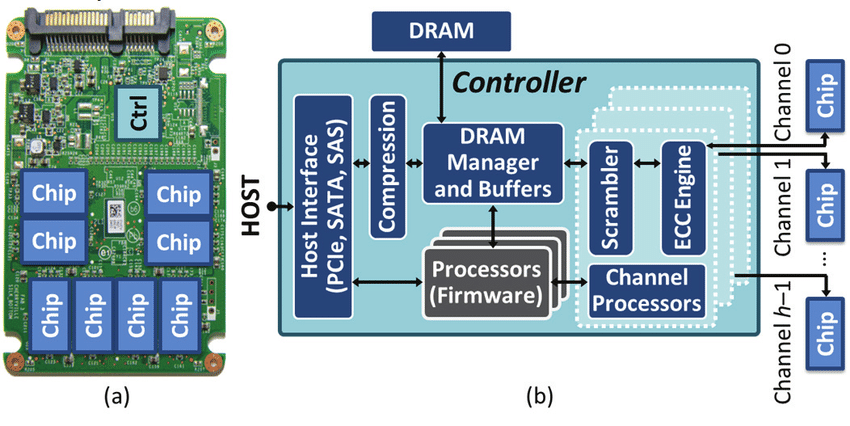
NAND flash sits inside far more devices than people realize, and “not detected” looks slightly different on each one. An SSD (SATA or NVMe) that stops showing up in BIOS or Disk Management, a USB flash drive that Windows or macOS can’t see at all, an SD or microSD card a camera or card reader refuses to read, and a smartphone that won’t boot past a logo screen because its internal NAND storage can’t be reached are all variations of the same underlying failure. Slim, sealed “monolith” NAND packages — common in compact USB-C drives and many phones — complicate DIY diagnosis further, since there’s no separate, socketed chip to inspect; recovery on these requires reading directly through test points on the package itself. If you want the fuller technical walkthrough of how a lab actually reads a failed chip once it's off the device, see our explanation of how NAND flash recovery works.
The failure mode is consistent across all of them: something between the OS and the NAND chip stopped working, while the chip itself, in the great majority of cases, still holds every file it did the day before. We see the same not-detected pattern across every major brand of NAND-based storage — Samsung and Western Digital SSDs, SanDisk and Kingston USB drives, Lexar and Toshiba memory cards, Seagate external drives, and ADATA flash storage all use the same controller-plus-NAND architecture, and the recovery approach doesn’t change based on the logo on the case. Whatever the brand, a device not recognized by Windows, macOS, or a phone’s own operating system almost always traces back to one of the same handful of causes above — not a wiped chip.
Not detected in BIOS, Disk Management, or File Explorer · shows as an “unknown device” · reports the wrong capacity · disconnects and reconnects repeatedly · feels hot to the touch or shows visible corrosion. Any one of these on its own is a hardware warning sign — stop using the device and have it evaluated rather than waiting for a second one to appear.
NAND Flash Myths — What’s True and What Isn’t
Myth: if NAND flash isn’t detected, the data is permanently gone. This is the single most common misconception we hear, and it’s wrong far more often than it’s right. NAND cells retain their charge without power indefinitely (barring extreme age or heat); “not detected” describes a communication failure, not an erasure. Chip-off techniques read the memory directly, sidestepping whatever failed in front of it.
Myth: water damage always destroys the NAND chip. Water is far more likely to corrode the board, connector, or controller than to penetrate the sealed NAND package itself. Devices that were quickly dried and never powered back on after exposure recover at meaningfully higher rates than ones that were repeatedly plugged in to “test if it still works.”
Myth: recovery software can fix a device that isn’t detected. Recovery software needs the operating system to see the drive in the first place; if NAND flash is not detected at the OS level, no scan-based tool can reach it, and running one repeatedly on an unstable device adds risk rather than removing it.
Myth: a formatted or “RAW” drive means the files are unreadable. A prompt to format is a request to rewrite the file system's map, not a statement about the files themselves. Declining the prompt and having the raw NAND data analyzed keeps recovery options open.
NAND Flash Not Detected: What to Do Next
Run this quick decision check the moment a NAND-based device goes undetected. Step 1: Does it show up on any computer, port, or cable at all? If nothing sees it anywhere, treat it as hardware failure. Step 2: Does it disconnect repeatedly, run hot, or make unusual sounds? Stop using it immediately — every extra power cycle risks further damage. Step 3: Is there any visible physical damage — a cracked board, bent connector, or water exposure? That’s a lab case from the start. Step 4: Did it work moments ago and simply vanish with no physical cause? That points to controller or firmware failure — still recoverable, but not something software troubleshooting fixes.
Whichever answer applies, the pattern is the same: nothing you can safely do at home changes whether the NAND memory itself still holds your files. What changes the outcome is what happens next — continuing to power-cycle a failing device, running repeated recovery-software scans, or attempting a DIY controller swap all risk turning a recoverable controller failure into a much harder case. An SSD not detected in BIOS or Disk Management gets the same advice as a USB drive or SD card: stop, don’t self-repair, and get an evaluation before more power cycles do more damage.
Who to Call: What Happens During Professional NAND Recovery
When a device with undetected NAND flash arrives at the lab, the first step is diagnosis — determining exactly which layer failed: connector, controller, firmware, or the NAND die itself. Connector and board-level faults get micro-repair; failed controllers get bypassed entirely with direct NAND access.
In a true chip-off recovery, the NAND memory chip is desoldered from the board and read raw on a specialized programmer, independent of the dead controller. The raw data that comes off the chip is scrambled by design — wear-leveling and error-correction algorithms spread and encode data across the memory — so it’s then reconstructed and reassembled into a usable disk image, restoring the original file structure. Monolith packages (sealed single-chip designs in slim USB-C drives and many phones) are read through exposed test points rather than a removable chip. Every recovery works from the original device, and most NAND flash not detected cases resolve in 1–3 business days under eProvided’s “No Data, No Data Recovery Fee” policy — you only pay when your files actually come back.
For a deeper look at how NAND memory itself is engineered, see our NAND flash recovery page, which covers the recovery process end to end. It’s worth repeating: a NAND failure — controller, firmware, or physical — is not the same thing as NAND data recovery being impossible. In our lab, the two are rarely connected.
How to Prevent NAND Flash Failures
Not every NAND flash failure is preventable — a power surge or a dropped phone happens regardless of how carefully a device is used — but a few habits meaningfully lower the odds. Use a surge protector or a UPS for desktop SSDs, especially in areas with unstable power; unplug USB drives properly (use “Safely Remove Hardware” rather than pulling the drive mid-write) to avoid the sudden power interruptions that corrupt firmware; avoid letting any flash storage device sit completely full for long stretches, since heavily worn cells near capacity are the first to show controller stress; and keep a second, independent backup of anything irreplaceable, since no flash device — regardless of brand or price — is immune to controller failure eventually. None of this prevents every case, but it shrinks the odds of the worst ones.
What Our Customers Say
Frequently Asked Questions
That same chip-level read is what let us pull NASA Helios mission data off a module recovered from the Pacific after the aircraft broke apart. Government archive or a silent SSD at home, the diagnostic starts the same way — see our highest-stakes recovery work.
Recover Data from Undetected NAND Flash
SSD, USB drive, SD card, or phone gone silent? Our engineers will tell you exactly what’s recoverable — free, no obligation, completely confidential.
Start My Free NAND Recovery Evaluationor call (866) 857-5950 now
Related Recovery Services
Whatever device the undetected NAND flash lives inside, these recovery services get the data back: