
USB Flash Drive Data Recovery
USB Flash Drive Data Recovery & Repair Service
Can data be recovered from a broken or corrupted USB flash drive?
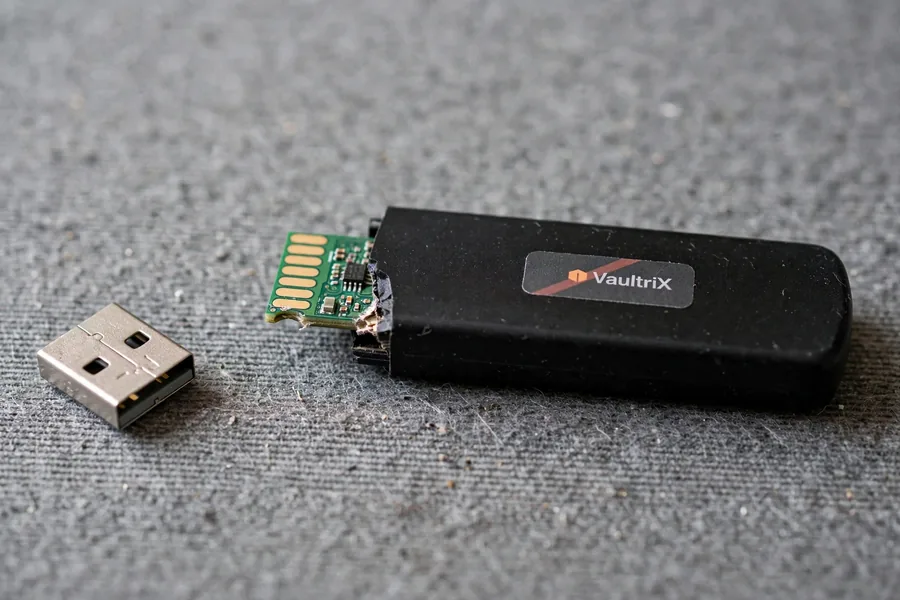
Yes — even a snapped connector, crushed casing, or drive that shows 0 bytes usually leaves the NAND flash memory chip intact. On a standard USB drive, eProvided reads that chip directly, bypassing the broken controller or connector. Drives with a separate security chip are judged first. eProvided averages a 98% success rate across all cases, free evaluation first.
“The connector is the part that breaks — the memory chip behind it almost never does.” — Bruce Cullen, founder, eProvided
 Enlarge
Yes, data can be recovered from a broken, damaged, or unrecognized USB flash drive — even when the connector is snapped off or the drive shows zero bytes. eProvided performs USB flash drive recovery at the chip level, physically extracting data from the NAND flash memory when software and other labs have failed. Since 1999 we have recovered data for clients including NASA, the FBI, and the U.S. Navy. With our free evaluation and No Data, No Data Recovery Fee guarantee, you have nothing to lose.
When a USB flash drive fails — a snapped connector, electrical surge, dead controller chip, or file system corruption — the data inside the NAND chip almost always survives. The only question is whether your recovery provider has the equipment to reach it. eProvided averages a 98% success rate across every major brand — SanDisk, Kingston, Samsung, Lexar, PNY, Transcend, and dozens more. Call (866) 857-5950 or start your free evaluation online.
- What Is USB Flash Drive Recovery?
- How USB Drive Recovery Works
- Common Causes of USB Flash Drive Failure
- Types of USB Flash Drives We Recover
- DIY Software vs Professional Service
- Broken & Physically Damaged Drives
- Water-Damaged USB Flash Drive Recovery
- Real USB Cases From Our Records
- USB Flash Drive Repair Services
- Flash Drive Brands and Compatibility
- USB Flash Drive Data Recovery Cost
- Our Recovery Process
- What Customers Say
- Frequently Asked Questions
- Related Recovery Services
Free USB Flash Drive Recovery Evaluation
Ship your drive to our lab — we diagnose the failure for free, with a firm quote before any work.
Get My Free EvaluationOr call (866) 857-5950
What Is USB Flash Drive Recovery?
USB data recovery is the process of extracting data from a flash drive that has failed due to physical damage, electrical malfunction, controller failure, or file system corruption. Unlike hard drive recovery, USB recovery targets the solid-state NAND flash memory chip soldered inside the drive's housing — not spinning platters. Whatever you call it, the engineering answer is the same: reach the NAND chip and read it directly.
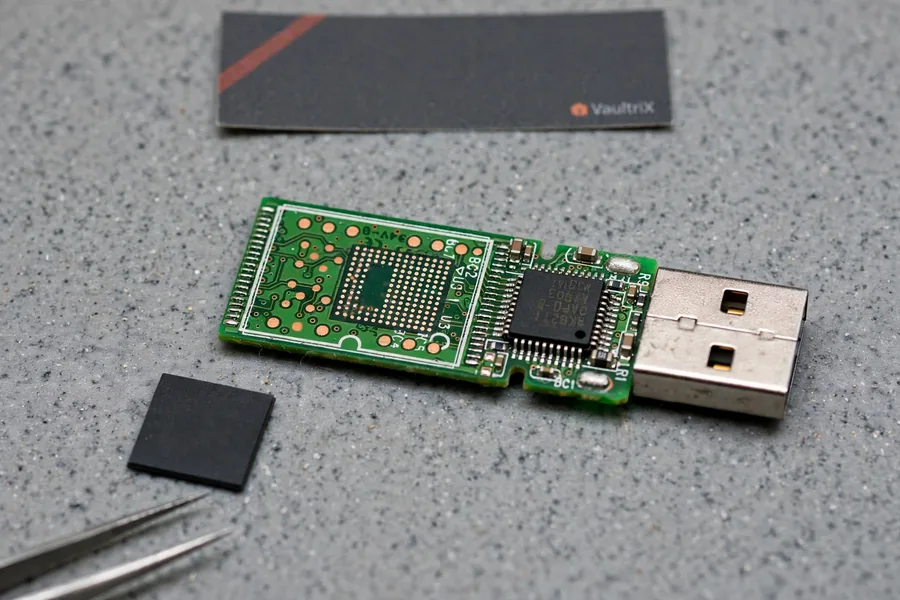
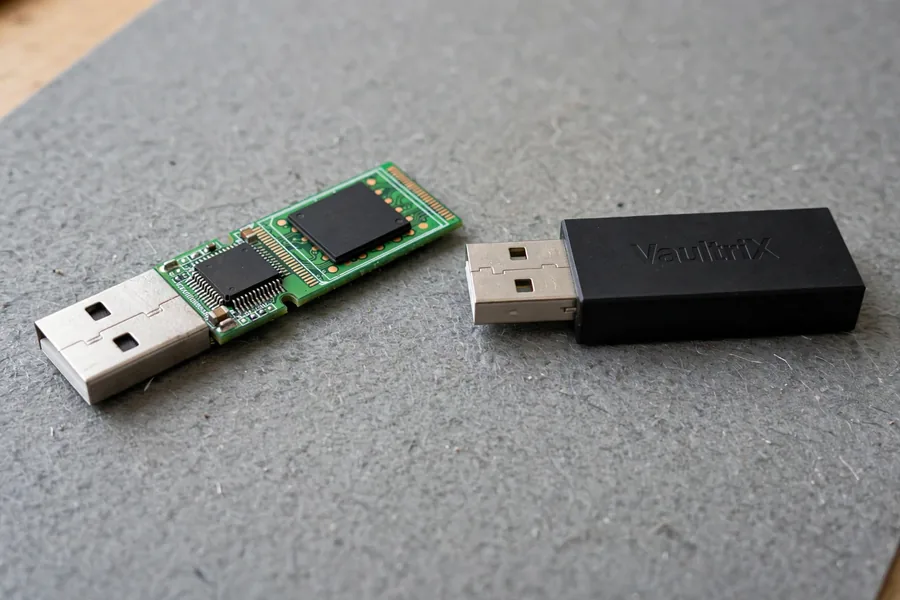
Every USB flash drive has three parts: the connector you plug in, the controller chip that manages communication, and the NAND chip where your files actually live. When any part fails the drive goes dead — but the NAND almost always survives. Reaching that data without the drive's own controller is exactly what our chip-off NAND recovery is built to do: desoldering the chip and reading it directly, bypassing dead controllers, snapped connectors, and destroyed boards. The one damage that cannot be undone is the NAND chip itself cracked through, broken off, or crushed; a chip that only looks smashed can still be read, and only a lab can tell, under a microscope. For everything else — dead controllers, water damage, RAW file systems, "please insert disk," and unrecognized drives — recovery is usually possible.
How USB Drive Recovery Works
 Enlarge
Professional USB data recovery follows a methodical five-step USB recovery process, and no paid work proceeds without your approval. Here is exactly what happens after your drive reaches our lab.
Step 1: Visual Inspection
We examine the drive and PCB under 40x magnification, documenting bent or snapped connectors, cracked boards, burned components, corrosion, and damage to the NAND package. This sets the recovery path before any power is applied.
Step 2: Electrical Diagnostics
If the board looks intact, we connect through a write-blocked interface and check for USB enumeration, current draw (a healthy drive pulls 100–500mA), and controller response. Zero enumeration sends the drive straight to chip-level recovery.
Step 3: Controller-Level Recovery
For drives with a responsive controller, we image data through the USB interface using forensic tools that bypass bad sectors and corrupted partition tables — the path for logical failures like accidental formatting or RAW conversion where the hardware still works.
Step 4: Chip-Off NAND Recovery
When the controller is dead or the board is destroyed, the NAND chip is desoldered with a precision rework station and read on a specialized programmer that talks directly to the memory cells. Raw NAND data is then rebuilt using the ECC algorithms specific to your drive's controller. Because NAND has a finite write life, this stage relies on the same endurance limits defined by JEDEC's NAND endurance and data-retention standards.
Step 5: File System Reconstruction
We rebuild the file system (FAT32, exFAT, NTFS, HFS+, ext4), verify the files, and provide a complete listing before delivery. Recovered data is returned on a new USB drive or via our secure download portal.
Common Causes of USB Flash Drive Failure
Most USB failures leave the NAND intact — here are the types our lab sees most, ranked by frequency.
Snapped or Bent Connector
The number-one reason people contact us. A drive bumped while plugged into a laptop can shear the USB-A connector off the board, severing the data lines. The NAND often survives, and when it does the files can be read.
Controller Chip Failure
The controller is the drive's brain. When it fails from a power spike, firmware corruption, or age, the drive shows up as unrecognized, reports zero capacity, or triggers a "USB Device Not Recognized" error. The NAND is usually unaffected, so chip-off is the usual route.
Customers describe this the same way every time: “I plugged it in and the computer doesn’t recognize it.” It usually points at the connector, the board or the controller, not at the memory.
File System Corruption
Pulling a drive without ejecting can corrupt the FAT32 or exFAT table. The drive shows RAW, asks to be formatted, or lists zero-byte files — yet the data usually remains on the NAND. We rebuild the file table and recover your files with folders and names intact.
Electrical Damage
A voltage spike from a bad hub, cable, or port can fry the controller and regulator. Internal voltage clamping can protect the NAND, so the surviving memory can be read by chip-off while bypassing the burned controller.
Water and Environmental Damage
Washing machines, pools, and humidity corrode the PCB, and salt water accelerates it dramatically. But the NAND is sealed in a moisture-resistant package. Our recovering a shattered USB drive process includes ultrasonic cleaning, trace repair, and chip-off when the board can't be saved.
NAND Wear-Out and Firmware Corruption
Every NAND cell has a finite write life (roughly 3,000–10,000 cycles for TLC). Heavy use produces rising read errors, while corrupted controller firmware can leave a drive detected but unmountable or showing the wrong capacity. We extract worn NAND with advanced ECC and reprogram corrupted firmware to read the data back.
Types of USB Flash Drives We Recover
 Enlarge
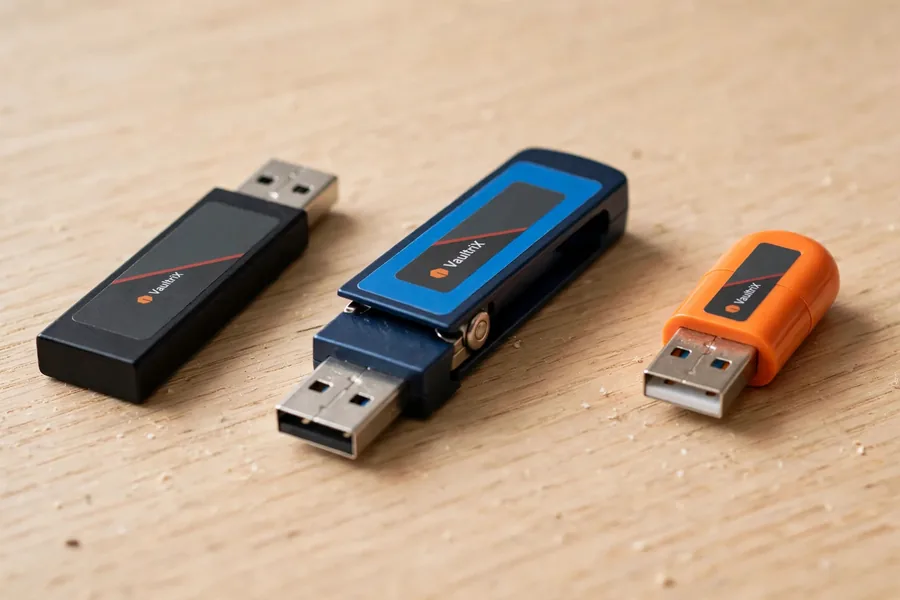
If it stores data on NAND and connects via USB, we handle the USB flash data recovery — every form factor, capacity, connector, and brand. Inside, a USB drive is built one of two ways: a board with a separate controller and memory chip, which we can lift off and read, or a monolithic module where the controller and memory are one sealed block, which we read through its test points. Each needs a different chip-off approach.
That covers bare thumb and pocket-size flash drives. If your device is a full portable hard drive that plugs in with its own USB cable, the recovery approach is different — see our external hard drive data recovery guide.
USB-A, USB-C, Micro/Mini-USB
Standard rectangular USB-A is the most common — and the most fragile, because the drive protrudes from the port and concentrates force on the solder joints, making snapped connectors the #1 physical failure. USB-C (24 pins, reversible) and the older Micro/Mini-USB connectors are electrically identical for recovery purposes. The USB-IF, the body that defines the USB standard, sets these interface generations, but USB version (2.0, 3.2, USB4) never changes recoverability — chip-off reads the NAND directly, independent of the connector or protocol.
Encrypted, Ruggedized, Pen, and External Drives
Hardware-encrypted drives (IronKey, Apricorn Aegis) store AES-256 data on the NAND; with the password we repair the physical failure and mount the volume — without it, the data is inaccessible by design. On these drives chip-off returns ciphertext, so we repair the original board instead. "Waterproof" and ruggedized drives still fail from condensation and NAND wear. Thin pen drives use budget NAND but can be read by chip-off using our controller and NAND database. External USB hard drives and SSDs share the interface but use different storage — see our hard drive recovery service for platters and enclosures, and for failed solid-state drives (NVMe, M.2 and SATA) see SSD recovery. For external USB hard drive recovery specifically, the USB bridge board inside the enclosure often fails independently of the platters or NAND inside, so our lab tests the bridge and the drive separately before choosing a recovery path.
DIY Software vs Professional Service
Before paying for professional flash drive data recovery, many people try recovery software first. Here is an honest comparison of when it helps and when it makes things worse.
| Scenario | DIY Software | eProvided Professional |
|---|---|---|
| Deleted files (drive recognized) | Often works if no new data written | Higher success, preserves names and folders |
| Formatted drive (recognized) | May recover files without names | Full file system reconstruction |
| Drive shows RAW / asks to format | May miss fragmented files | Rebuild file table from raw NAND |
| Drive not recognized | Cannot work — no enumeration | Chip-off bypasses dead controller |
| Broken connector / physical damage | Cannot work | Connector repair or chip-off extraction |
| Water / fire / crush damage | Cannot work | PCB repair, cleaning, chip-off |
| "USB Device Not Recognized" / 0 bytes | Cannot work — not mounted | Controller diagnosis, firmware or chip-off |
The rule is simple: if your computer still sees the drive as a mounted volume, trying data recovery software first is reasonable. If the drive is physically damaged, not recognized, or shows zero capacity, software cannot help and repeated attempts degrade the NAND further. Flash media also makes deletion deceptive: as NIST's media-sanitization guidelines (SP 800-88 Rev. 2) explain, formatting only removes pointers — the cells still hold data, which is why recovery works. In a hardware-failure case, power the drive off immediately and call (866) 857-5950. Once you are dealing with corruption after a drop, or hardware damage after water or impact, stop running software and let a lab open the case.
Broken & Physically Damaged USB Flash Drive Recovery
Physical damage is the number-one reason drives arrive at our lab, and recovering them is our core specialty. The critical question is always the same: did the NAND chip survive? Usually, it did.
Snapped Connector or Cracked PCB
When the connector shears off, we re-solder a replacement or bridge the broken traces directly on the board. When a crack severs dozens of traces, we remove the NAND and read it on our programmer; if the crack runs through the NAND footprint, the chip is reballed first. For a broken thumb-style drive, the same techniques apply — see our broken thumb drive recovery.
Heat, Fire, Impact, and Crush Damage
Fire and extreme heat kill the controller and passives first, while the NAND's package provides some thermal insulation. Drives that are stepped on or run over arrive with shattered housings, but NAND is a small solid die with no moving parts. Unless the chip package itself is cracked through under magnification, impact-damaged drives have recovery prospects through chip-off.
Water-Damaged USB Flash Drive Recovery
 Enlarge
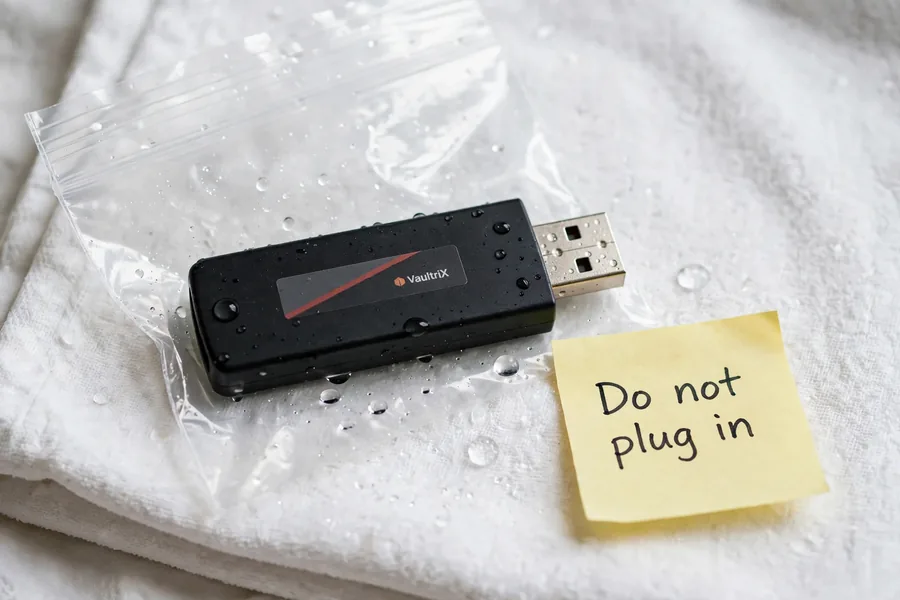
NAND flash is far more water-resistant than a hard drive — no moving parts, and the cells are sealed inside the chip package. So a soaked drive is usually recoverable.
What to do immediately: do NOT plug in a wet drive, and do not dry it with heat (hair dryer, oven, microwave) or rice — heat speeds corrosion and rice does nothing but add dust. Seal it in a bag and contact us quickly.
Fresh water (tap, rain, pool) corrodes traces over hours to days; treated fast, the board can often be ultrasonically cleaned and repaired without chip-off. Salt water eats copper within hours and almost always needs chip-off — but the sealed NAND is typically fine. Washing-machine drives do survive; the main risk is spin-cycle force cracking the board, and one recovered washing-machine case is quoted below.
Bruce Cullen recovered the NASA Helios mission’s environmental data from a saltwater-corroded CompactFlash card, a card he still keeps in his office. If chip-level recovery can pull data off that, a washed USB drive is worth a free evaluation. Call (866) 857-5950.
Broken or Water-Damaged Flash Drive?
Ship it to our lab for a free evaluation. We recover data from drives other companies can't.
Get My Free EvaluationReal USB Cases From Our Records
Four of the many USB drives we have handled, in the customers’ own words from the evaluation form, with the lab’s recorded outcome. Three came back and one did not. Case IDs and dates are real; names are left out.
“The flash drive was in my laptop and the laptop fell. The USB interface connector was broken off of the flash drive PCBA. A USB dongle was soldered to the PCBA by qualified PCBA repair technicians in an effort to recover the data. The USB drive was unable to connect to a PC after the repair.”
Case OXN2ZI, February 2015. Recovered. The drive arrived on March 2, 2015 after another shop’s repair attempt, and the lab’s note on March 3 records a successful recovery.
“USB bent and broke off the attached portion that goes into computer to read.”
Case NJ0FLD, February 2018. Recovered. The first, basic attempt failed, the customer approved an advanced recovery, and the lab recorded a success on May 12, 2018.
“USB Drive went through washing machine.”
Case IOBBYH, June 2012. Recovered. The drive arrived on June 25, 2012, and the lab recorded a success on June 26. This is one of a few recorded washing-machine drives, not a promise for the next one.
“Dog destroyed flash drive that had accidentally fallen on floor. Memory chip has one large crack all the way through.”
Case KOFHX7, May 2010. Not recovered. The lab’s note on June 3, 2010 records that the NAND chip was cracked all the way through, and the drive went back to the customer. A chip cracked through is the one damage that cannot be undone, which is why a free evaluation comes first.
USB Flash Drive Repair Services
People who want to repair a USB flash drive usually need one of two things: someone to repair a USB drive so it works again, or the data off it. Our goal is always USB data recovery first — flash drive repair goes only as far as needed to image your files safely, then return them on new media. We do not recommend reusing a repaired drive for important data. Whichever way you search — USB drive repair, repair USB drive, or usb port repair — the diagnostic steps are identical: confirm whether the connector, controller, or NAND chip is the actual point of failure before choosing a fix.
Connector, Trace, and Component Repair
To fix a USB flash drive with a broken connector, we solder a replacement onto the existing pads or, when the pads are torn off, trace the circuit back to the next connection points and bridge to them. Cracked boards are rebuilt by bridging severed traces with fine 30-AWG wire under magnification, and burned surface-mount parts are swapped from our donor-drive inventory. Each method to repair a USB drive restores enough function to image the data through the drive's own controller, preserving original file names and folders. For a physically damaged drive the honest answer to “how do I fix it myself” is that DIY tools rarely reach a snapped connector or a dead controller, and repeated attempts risk wearing the NAND further. If your board is intact and you just want a walkthrough, our online USB flash drive repair evaluation starts with a free diagnosis rather than guesswork.
When Repair Isn't Possible
Extensive corrosion, damaged NAND ball-grid pads, or a controller with internal die fractures can make board-level repair impossible. On drives with no separate security chip, chip-off NAND extraction is then the only path — and it can work even when the entire PCB is destroyed, because we read the NAND chip directly. Many "unrecognized" cases land here; see our fix a USB device not recognized error page. This is also where a broken USB drive usually ends up — not because the data is gone, but because the board-level path to it is gone. Once you are past connector and trace repair, the only remaining route is USB drive data recovery straight from the chip.
Flash Drive Brands and Compatibility
 Enlarge
Our controller and NAND database covers a very wide range of models, so recovery is effectively brand-agnostic. SanDisk (Cruzer, Ultra, Extreme) is among the most common drives in our lab and needs SanDisk-specific ECC, which our tools support. Kingston uses Phison, Silicon Motion, or proprietary controllers; Samsung uses its own V-NAND; and Lexar, PNY, Transcend, Patriot, Verbatim, Corsair, and ADATA mix third-party NAND and controllers — identical process once the pairing is identified. The same chip-off methods extend to cards: see microSD card recovery for the tiny cards, and for full-size SD and CF cards that are cracked or bent, the damaged memory card page. Model families change often, so identification comes first: we read the controller and memory markings under magnification and match the pairing before choosing any settings, and when a maker uses its own firmware or encryption we say so before work begins. That is why a brand name alone never decides the quote, and why the free evaluation looks at the board, not the label.
USB Flash Drive Data Recovery Cost
USB data recovery pricing depends on the severity of damage, and every USB disk recovery case begins with a free evaluation — we never charge to diagnose your drive. Logical recovery (deleted files, formatting, corruption on a drive that still mounts) is the least expensive tier. PCB-level repair (broken connectors, cracked boards, microsoldering) is mid-range. Chip-off NAND recovery (dead controller, destroyed board, severe water damage, encrypted drives with physical failure) is the most complex.
Whatever the tier, the policy is absolute: No Data, No Data Recovery Fee. If we cannot recover your files, you pay no recovery fee. For ranges, see our what professional recovery costs, or call (866) 857-5950.
Our USB Flash Drive Recovery Process
Here is what to expect when you send your drive to eProvided.
1. Contact us. Call (866) 857-5950 or fill out our online form — tell us what happened and we'll send shipping instructions.
2. Ship your drive. Pack it with bubble wrap (no loose peanuts touching the drive) and ship to 9527 Knopfler Ln, Las Vegas, NV 89148. We receive drives from every state and overseas.
3. Free evaluation. Within 1–2 business days we diagnose the failure and contact you with the cause, recommended method, success probability, and exact cost — with a free evaluation and cost estimate. No work proceeds without your written approval.
4. Recovery. Standard USB data recovery takes 3–7 business days after approval; chip-off cases 5–10. Expedited 48-hour service is available for urgent cases.
5. Verification and delivery. We send a complete file listing for your review, then return recovered data on a new USB drive or via our secure download portal.
What Our Customers Say
For more, read verified reviews on Trustpilot or see customer experiences on eProvided on Reddit, and learn more about eProvided.
Frequently Asked Questions: USB Flash Drive Data Recovery
How much does USB flash drive data recovery cost?
Pricing varies by failure type, and every case starts with a free evaluation. Logical recovery from a drive that still mounts costs less than chip-off from a destroyed drive. Our policy: No Data, No Data Recovery Fee — you pay only if we recover your files. Call (866) 857-5950 or see our pricing page.
Can you recover data from a USB flash drive that is not recognized?
Yes. An unrecognized drive usually has a failed controller, damaged connector, or corrupted firmware, while the NAND holding your files is intact. Our chip-off process bypasses the dead controller and reads the memory directly — recovering drives that show "USB Device Not Recognized," "Please Insert Disk," zero bytes, or don't appear at all. See our USB device not recognized page.
How long does USB flash drive recovery take?
Standard USB data recovery takes 3–7 business days from when we receive your drive; chip-off cases take 5–10 depending on NAND complexity. Expedited 48-hour service is available for time-sensitive cases like legal evidence or business-critical documents. Call (866) 857-5950 to discuss rush processing.
Can a broken USB flash drive be fixed?
Often, yes. To fix a USB flash drive, broken connectors can be resoldered and cracked boards bridged, and failed components replaced from donor drives. But the goal is always data recovery first: we repair the drive only enough to image your data safely, then return your files on new media. We don't recommend reusing a physically repaired drive for important data.
Is it safe to use data recovery software on a damaged USB drive?
Only if the drive is recognized and the damage is purely logical (deleted files, accidental formatting). If it's physically damaged, not recognized, or shows the wrong capacity, do NOT run software — repeated read attempts can cause further NAND degradation or complete loss. Power it off and contact a professional lab; every failed DIY attempt can raise the risk and cost.
Do you recover data from USB drives that went through the washing machine?
Often, yes. Detergent and water corrode the PCB, but the sealed NAND package usually protects the data, and our records include a recovered washing-machine drive. Do not dry the drive with heat or plug it in wet; seal it in a bag and ship it quickly. The sooner we receive it, the less corrosion progresses and the better the odds.
What does it mean if my USB drive is cracked or the memory chip looks damaged?
A cracked case or snapped plug is usually fine, because the memory chip sits apart from both. A chip that is itself cracked through, broken off or crushed is the one damage that cannot be undone, and a chip that only looks smashed can still be read. Only a lab can tell, under a microscope, so send the drive for the free evaluation.
Can you recover a drive that someone else already tried to repair?
Often, yes. Case OXN2ZI above arrived after another shop soldered on a new connector, and the data still came back. Tell us what was done, because extra soldering can lift pads, and do not plug a repaired drive in again. We check the board first and then choose the route.
Can you recover files from a hardware-encrypted USB drive?
Only with the password. We repair the physical failure so the volume mounts, but the encryption stays on the NAND and cannot be bypassed. Without the password the data is unreadable by design. Software-encrypted volumes such as BitLocker or VeraCrypt are the same: the key is yours, and we cannot supply it.
Does the drive’s brand or size change the odds?
Not the odds of reaching the data. Our process works the same on SanDisk, Kingston, Samsung, Lexar and the other brands once the controller and memory pairing is identified, and USB version never matters. Damage type does: a snapped plug is far better news than a crushed memory chip.
Should I keep trying the drive in different ports?
No. Each attempt with a bent or loose connector risks shorting the board or wearing the memory. If the drive is not recognized after one or two normal tries, unplug it, put it in a small bag, and send it for the free evaluation before anyone applies heat or a soldering iron.
Ready to Recover Your USB Flash Drive Data?
27+ years of USB flash drive recovery expertise. 98% success rate.
Get My Free EvaluationOr call (866) 857-5950 • 9527 Knopfler Ln, Las Vegas, NV 89148
Related Recovery Services
A dead flash drive is one of many failures the lab handles. Choose the device you need recovered from the related services below.