
Used by NASA · the FBI · the U.S. Navy · Since 1999
Who to Turn to When Your iPad Breaks and You Need Your Data Back
- No Data, No Data Recovery Fee
- Every model — iPad, Air, Pro & Mini
- 27+ years of recovery experience
- In-house board-level repair — our specialty
Can data be recovered from a broken iPad?
Yes, usually. Data can often be recovered from a broken iPad, because a cracked screen or dead board rarely touches the NAND chip — it stays paired with the processor's Secure Enclave. If the board still boots, data is reachable directly; if not, board-level repair or a paired donor-board transplant is the honest fix, never a simple chip swap.
“A cracked screen tells you nothing about the memory. What matters is whether the board underneath still works — and if it doesn't, whether we can move it, paired, to one that does.” — Bruce Cullen, founder, eProvided
An iPad breaking is rarely a data problem the moment it happens — it's a glass, digitizer, or logic-board problem, and those are not the same thing as the chip that holds your photos, documents and messages. After 27+ years running phone and tablet data recovery on drives that arrived dropped, cracked or waterlogged, we can tell you what actually breaks when an iPad fails, why the honest recovery path is board repair or a donor-board transplant rather than a simple chip swap, and what to do — and not do — before you hand it to anyone.
Inside every iPad, the NAND memory chip that holds your data is paired to the processor's Secure Enclave, which holds the encryption key. That pairing is why simply desoldering the memory chip and dropping it into another iPad does not work on any iPad with Touch ID or Face ID — the chip alone is encrypted, unreadable ciphertext without its matching processor. The honest recovery path is: if the board still boots, get the data off it directly; if it doesn't, repair the board itself; and if the board can't be repaired, transplant the processor and NAND chip together onto a donor board. None of that requires the housing, screen, or battery to be intact.
Do RIGHT NOW
- Stop trying to charge or power on a cracked-screen iPad repeatedly
- Keep any loose or cracked pieces together, including the digitizer
- If it was wet, power it off and do not attempt to charge it
- Note what happened (dropped, cracked, wet, won't power on) before you call
DON’T Do
- Don’t let a repair shop swap the logic board wholesale — a stock replacement board does not carry your data or your Secure Enclave pairing
- Don’t assume a factory reset or DFU restore is safe if you haven't backed up first
- Don’t continue using a cracked screen if the digitizer is failing — further use can short the board
- Don’t throw away a “dead” iPad — a board that won't boot is not the same as data that's gone
Already dealing with a broken iPad? Send it in for a free evaluation, or call (866) 857-5950 and describe the damage first.
- What’s Actually Inside a Broken iPad
- Common iPad Damage & What It Does
- Why a Simple Chip Swap Doesn’t Work
- The Real Recovery Path: Board Repair or Donor Transplant
- Check iCloud and Your Computer First
- What Our Customers Say
- Frequently Asked Questions
- Recover Files from a Broken iPad
- Related Recovery Services
What’s Actually Inside a Broken iPad

An iPad is built around one central logic board carrying the processor, the NAND flash memory, and every other core component, all wrapped in a glass front, an aluminum back, a battery and a screen assembly. The glass, the digitizer that senses your touch, the battery and the housing exist to make the device usable and portable — none of them hold a single byte of your data. Every photo, document and message you’ve ever saved lives on the NAND chip on that logic board, and on modern iPads (any model with Touch ID or Face ID, meaning iPad Air 2 from 2014 onward and every iPad Pro), that chip is cryptographically paired to a Secure Enclave built into the processor itself. That pairing is the single most important fact for recovery: the data and the key to read it live in two different places on the same board, which is exactly why what happens to the glass on top almost never determines whether your files survive.
This is also why eProvided treats a broken iPad as a board-level repair case first, not a chip-swap case. A cracked screen or dead battery leaves the board — and the pairing between the NAND and the Secure Enclave — completely intact, which means the fastest and safest path is almost always working with that exact board, not replacing parts of it. On the rare handful of very old iPads that predate Touch ID (the original iPad and iPad 2, released 2010–2011), that Secure Enclave pairing doesn’t exist, which does open up more recovery options — but the overwhelming majority of the iPads we see today are the modern, paired kind, and that’s the case this page focuses on.
Common iPad Damage & What It Does

Almost every “broken iPad” case we see falls into one of a small number of patterns, and each one damages a different part of the device than the one holding your data. A dropped iPad usually cracks the glass or the aluminum frame, and the digitizer may stop responding to touch — none of that is the board. An iPad that won’t power on after a drop or a bend often has a cracked solder joint or a disconnected battery or display cable, which is a board-level electrical fault, not memory damage. Water exposure is the one pattern that can genuinely threaten the board itself, because corrosion spreads across components over time — which is why powering off immediately and not charging it matters more with water than with any other kind of damage. Even a screen shattered badly enough to look unusable rarely tells you anything about what's happening underneath it, since the glass and the logic board are two entirely separate layers that fail independently of each other. The table below breaks down what we see most often, what it actually affects, and how it changes the recovery approach.
| Common iPad Damage & What Actually Breaks | ||
|---|---|---|
| What happened | What it usually damages | Data recoverable? |
| Dropped, screen cracked | Glass and digitizer; board usually unaffected | ✓ Yes, board still boots |
| Won’t power on after a drop | Cracked solder joint or a disconnected battery/display cable | ✓ Yes, board-level repair |
| Bent frame or housing | Aluminum housing flexes; can crack a solder joint on the board | ✓ Yes, board-level repair |
| Liquid exposure | Corrosion on board components — spreads if power stays on | ✓ Usually, if powered off quickly |
| Board physically crushed | Rare; can damage the NAND package or Secure Enclave directly | • Evaluated case by case |
Why a Simple Chip Swap Doesn’t Work
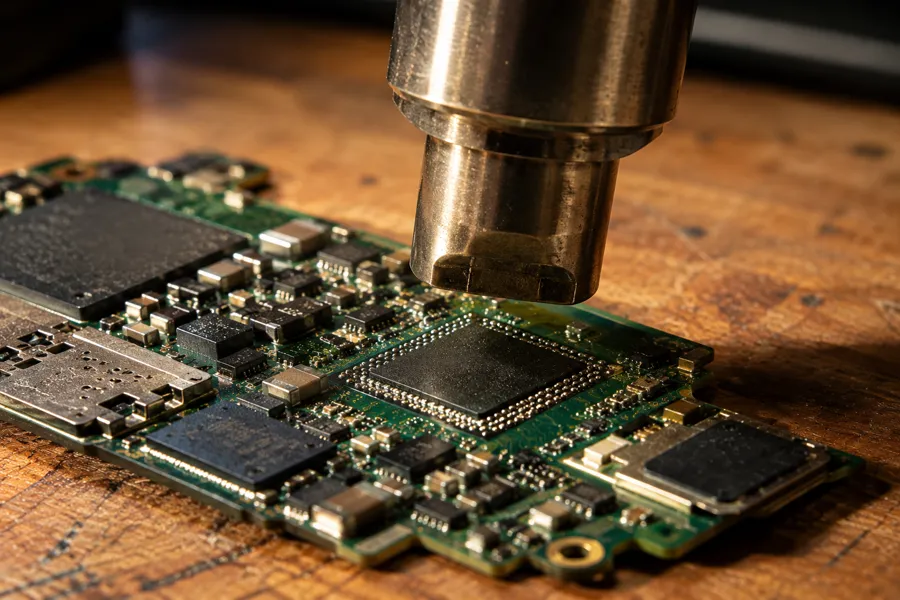
It's a common assumption — understandable, but incorrect for any modern iPad — that a broken device can be fixed by physically moving its memory chip into a working iPad. That works on media with no processor-bound encryption, like a standard USB flash drive or SD card, which is why you may have heard of “chip-off” recovery elsewhere. An iPad with Touch ID or Face ID is different: the NAND chip's contents are encrypted with a key that lives inside the Secure Enclave portion of that specific processor, and that key never leaves the Secure Enclave in a form that can be read out and reused elsewhere. Desolder the NAND chip alone and place it on a donor board with a different processor, and you get back nothing but unreadable ciphertext — the new board's Secure Enclave doesn't hold the key your data was encrypted with. That single fact is why we don't offer or promise a plain chip-off service for modern iPads, even though it's the right method for other flash-memory devices.
The Real Recovery Path: Board Repair or Donor Transplant

Because the processor and NAND chip must stay paired for the encryption to resolve, our recovery process for a broken iPad follows a strict priority order, always starting with the least invasive option. We evaluate every iPad for free before touching it, using the same data recovery process across the whole priority order. First, if the board itself still boots — even with a cracked screen or a dead battery — the data is usually reachable directly through the board's own diagnostic connections, no repair needed. Second, if the board doesn't boot because of a cracked solder joint, corrosion, or a damaged component, we perform board-level repair on the original board — reballing, trace repair, or a targeted component swap — which keeps the exact same processor and NAND chip paired the whole time. Third, only if the original board truly cannot be repaired, we move to a donor-board transplant: the processor and NAND chip come off together, as a pair, and go onto a compatible donor board, preserving the same Secure Enclave relationship the data was encrypted under. That order — direct access, then original-board repair, then paired transplant — is what actually determines whether an iPad's data comes back, far more than how dramatic the physical damage looked.
This article explains why iPad damage is usually recoverable and how the method works; if your iPad is already broken and you want it evaluated, that’s a separate step with its own quote and turnaround — start there when you’re ready to send it in.
Check iCloud and Your Computer First
Before any board work is worth paying for, it's worth ten minutes to rule out the easy answer: many iPads are already backed up somewhere.
iPad Recovery Tips, Connect to a PC. Depending on how the iPad is damaged, it may still connect to a computer over its charging cable. If the board still boots and the port still makes contact, plugging it into a Mac or PC can be enough to pull files off directly — worth trying gently once, before anything else, as long as the connector itself isn’t the part that broke.
iPad Breaks, Cloud Storage to the Rescue. If iCloud backup was turned on, log into icloud.com from any browser or another Apple device and check whether a recent backup exists — photos, documents and app data can often be restored straight to a replacement iPad from there. If the iPad was ever plugged into a Mac or PC with Finder or iTunes, check whether a local backup was created automatically; those live on the computer itself and don't require the broken iPad at all. Neither of these helps if the last backup is old, was never turned on, or is missing recent work — which is the situation most people are actually in when they call us — but checking costs nothing and can save you the cost of a recovery entirely.
What Our Customers Say
Frequently Asked Questions
Recovery Services for Every Storage Device Class
An iPad isn’t the only device that can fail this way — eProvided recovers data from every storage class in one lab: hard drive data recovery (Seagate, Western Digital, Toshiba mechanical and logical failures — Samsung and Crucial SSDs handled on our SSD service, NVMe and SATA), memory card recovery (SD, microSD, CompactFlash cards and every format) and USB flash drive recovery. Whichever device is involved, the same recovery lab and process applies from intake through return shipping. See all our data recovery services →
More Phone & Mobile Recovery Guides
- Everything to know about iPhone recovery — the full guide to what happens during an iPhone data recovery.
- The dangers of cell phone memory add-ons — why third-party storage add-ons put your data at risk.
- When your iPhone will not turn on — what a dead iPhone means for your data and what to try first.
Once your iPad's data is safe, turning on iCloud or computer backups is the single best way to make sure the next drop is a repair bill, not a recovery case.
Recover Files from a Broken iPad
Cracked screen, won’t power on, or water damage — our engineers will confirm what’s recoverable from your iPad during a free evaluation. No obligation, confidential.
Start My Free iPad Evaluationor call (866) 857-5950 now
Related Recovery Services
A broken iPad isn’t the only device at risk. eProvided recovers every storage class from one lab — these recovery services get the data back: