
Used by NASA · the FBI · the U.S. Navy · Since 1999
iPhone Data Recovery: Why a Dead iPhone Almost Always Still Has Your Data
- No Data, No Data Recovery Fee
- Board-level repair & donor-board transplant
- 27+ years of recovery experience
- Every iPhone model, iOS 8 through the latest
Can Data Be Recovered from a Dead or Broken iPhone?
Usually yes — a dead or broken iPhone’s photos almost always survive on the NAND chip. But Apple fuses the decryption key into the processor, not the NAND, so reading the chip alone returns unreadable data. eProvided recovers it through board-level repair or a donor-board transplant that moves the processor and NAND together, averaging a 98% success rate.
“An iPhone isn’t a locked box with a key taped underneath — the box and the key are two separate chips, soldered to the same board. You need both, together, or you get nothing but noise.” — Bruce Cullen, founder, eProvided
An iPhone that won’t turn on, took a drop, went for a swim, or boot-loops after an update almost never loses the data stored on it — the phone fails around the memory chip, not on it. After 27+ years running cell phone data recovery on every iPhone from the earliest models to the latest release, we can tell you exactly what breaks inside a dead iPhone, why the popular idea of “chip-off recovery” doesn’t actually apply to a modern iPhone the way it does to a USB drive or SD card, and the honest recovery path when your iPhone won’t cooperate.
Dropping, drowning, wearing out the battery on, or update-crashing an iPhone almost never destroys the NAND memory chip holding your photos and messages — it damages the battery, the logic board’s power circuits, the screen, or the water seals. But an iPhone’s decryption key is fused into the processor chip, a separate piece of silicon from the NAND — so reading the memory chip alone, the way chip-off recovery does on a USB drive or SD card, returns encrypted data nobody can read. The honest recovery path is reviving the original logic board through board-level repair, or, when the board is too damaged, transplanting the original processor, NAND and EEPROM together onto a matched donor board. Moving the memory chip by itself recovers nothing.
Do RIGHT NOW
- If your iPhone still turns on at all, back it up to iCloud or a computer before doing anything else
- Note exactly what happened right before it failed (dropped, swam, shut down mid-update, wouldn’t hold a charge)
- Power off a wet iPhone immediately and leave it off — don’t plug in a cable to “test” it
- Check whether an iCloud or computer backup already exists from before the failure — it can shorten or skip the recovery entirely
DON’T Do
- Don’t run a Recovery Mode or DFU “Restore” on a dead or boot-looping iPhone if the data matters — that fixes the symptom by erasing the phone
- Don’t keep force-charging or repeatedly holding the restart buttons on a phone that won’t power on — that can push current through a logic board that’s already shorted
- Don’t let a general electronics shop attempt board-level soldering “to save money” — an amateur repair on the processor or NAND pads can destroy the one component pairing that unlocks the data
- Don’t assume a cracked screen or a phone stuck on the Apple logo means your photos are gone — both are usually failures well away from the memory chip
Already dealing with a dead or broken iPhone? Start a free evaluation, or call (866) 857-5950 and describe what happened to it.
- What Actually Happens When an iPhone Dies or Breaks
- Why the NAND Chip Almost Always Survives
- Why “Chip-Off Recovery” Doesn’t Work on a Modern iPhone
- How Board-Level Repair and a Donor-Board Transplant Actually Recover Your Data
- Protect Your Photos Before You Need To
- What Our Customers Say
- Frequently Asked Questions
- Recover Files from a Dead or Broken iPhone
- Related Recovery Services
What Actually Happens When an iPhone Dies or Breaks

Every iPhone is built around a handful of components that can fail independently: a lithium battery that ages with every charge cycle, a logic board carrying the processor and dozens of small power-management chips, a screen assembly, water-resistance seals that are only as good as the adhesive holding them, and the NAND memory chip that actually stores your photos, messages, and files. When an iPhone won’t turn on, dies at a random battery percentage, boot-loops on the Apple logo, goes dark after water exposure, or shows a cracked or black screen, the failure is almost always in one of the first four components — not in the memory chip itself, which is a sealed, solid-state part with no moving pieces and far more physical resilience than the battery, seals, or delicate solder joints around it.
That distinction matters because it means the phone dying is not the same event as your data dying. A four-year-old battery that can no longer deliver current under load, a power rail that shorted after a drop, or seals that let in a splash they used to shrug off all describe the phone failing — and in the overwhelming majority of cases we see, the storage chip holding your camera roll and message history comes through completely intact.
Why the NAND Chip Almost Always Survives
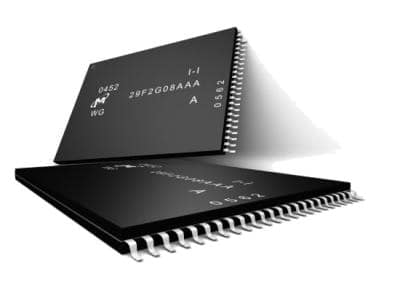
NAND flash memory, the same underlying technology used in USB drives, SD cards, and SSDs, has no moving parts and is packaged to survive far rougher treatment than a battery or a screen. A drop that cracks glass or a splash that corrodes a charging port rarely reaches the NAND chip, which sits soldered to the logic board behind layers of shielding and other components. Even a phone that is completely dead — no logo, no charge indicator, nothing — typically has a NAND chip in the same condition it was in the day before the failure.
The complication specific to iPhones is what that chip alone can tell you. On many older or simpler storage devices, the NAND chip carries both the data and everything needed to read it, so extracting the chip and reading it directly (chip-off recovery) is the correct, direct method — it’s exactly how we approach a broken USB flash drive or a cracked SD card. An iPhone is built differently on purpose, and that difference is the whole story of iPhone data recovery.
Why “Chip-Off Recovery” Doesn’t Work on a Modern iPhone

Since the iPhone 3GS in 2009, Apple has fused a unique identifier into the application processor itself — silicon that is physically separate from the NAND memory chip. Every byte written to the storage chip is encrypted using a key derived from that processor-bound identifier combined with your passcode. That design is exactly why removing the NAND chip and reading it on its own, the technique that works cleanly on a USB drive or SD card, returns nothing but encrypted noise on a modern iPhone: the chip holds the ciphertext, and the processor holds the only key that can turn it back into your photos and messages. Neither half is useful without the other.
This is the single most common misconception people bring to an iPhone data recovery search, and it’s worth saying plainly: a service advertising straightforward “chip-off” recovery for a modern iPhone with a working processor is describing a method that cannot succeed on that phone. The honest recovery paths work with the processor and NAND together, not around one of them. eProvided applies the same NAND expertise that powers our chip-off recovery work on USB drives and memory cards — the difference on an iPhone is that the chip is only ever handled as part of a matched processor-and-NAND pair, never read alone.
How Board-Level Repair and a Donor-Board Transplant Actually Recover Your Data
Because the decryption key lives on the processor, the correct recovery approach keeps the processor and NAND working together rather than trying to separate them. Our full data recovery process starts with a free evaluation of the specific failure before any work begins. The primary path, and the one that resolves most cases, is board-level repair on the phone’s own original logic board: replacing a failed power-management chip, repairing a shorted charging circuit, or reflowing a fatigued solder joint until the board can boot far enough to hand over a complete backup. Because this uses the phone’s own original processor, the encryption works in our favor — it’s the same silicon that has always decrypted this exact phone’s data.
When the original board is cracked, corroded past repair, or crushed — the second most common scenario — we move to a donor-board transplant: transferring the original processor, the original NAND chip, and (on most models) the EEPROM carrying the board’s identity data together onto a matched donor logic board. All three components travel as one unit because they are cryptographically paired to each other; moving the memory chip alone, or pairing it with a donor processor, recovers nothing. The goal of a transplant is usually one clean boot long enough to pull a complete backup — not a permanently repaired phone. Every recovered file is verified before it goes back to you, whether it left our bench through board-level repair, a donor transplant, or in a small number of straightforward cases, a supported diagnostic backup path once the board is stable.
This article explains why a dead or broken iPhone is usually still fully recoverable and how that recovery actually works; if your iPhone is already down and you want it evaluated, that’s a separate step with its own quote and turnaround — start there when you’re ready to send it in.
| Common iPhone Failures & What Actually Breaks | ||
|---|---|---|
| What happened | What it usually affects | Data recoverable? |
| Won’t turn on / dead battery | Worn cell or a failed power circuit — not the memory chip | ✓ Yes, via board-level repair |
| Boot loop after an iOS update | File-system or power-path fault during the update, NAND typically intact | ✓ Yes, via board-level extraction |
| Water or corrosion damage | Corrosion on the logic board and power circuits | ✓ Usually, via repair or donor transplant |
| Cracked or dead screen | Display assembly only — the storage chip is behind it, untouched | ✓ Yes, screen bypassed entirely |
| Board cracked, snapped, or crushed | The original logic board itself, beyond trace-level repair | ✓ Yes, via donor-board transplant |
Protect Your Photos Before You Need To

The fastest iPhone recovery is the one you never need. Turning on automatic iCloud backup, or plugging into a computer for a periodic encrypted backup through Finder or iTunes, means a dead battery, a cracked board, or a boot loop costs you a repair or a replacement phone — not years of photos and messages. If your iPhone is already down and no recent backup exists, that’s exactly the case a free evaluation is for; it doesn’t require the phone to power on first. A simple habit that helps: confirm your iPhone shows a recent “Last successful backup” date under Settings > [your name] > iCloud > iCloud Backup on every phone you own, not just the one currently in your pocket. It’s worth checking that setting today rather than after a phone stops working — a backup made the same week beats a recovery case every time, and it costs nothing but a couple of minutes and a Wi-Fi connection overnight.
What Our Customers Say
Frequently Asked Questions
Recovery Services for Every Storage Device Class
A dead or broken iPhone isn’t the only device eProvided recovers — we cover every storage class from one lab: water-damaged phone recovery, locked phone data recovery, hard drive data recovery (Seagate, Western Digital, Toshiba and Crucial mechanical and logical failures), NVMe and SATA SSD recovery, and CompactFlash, SD and USB flash memory recovery for every brand. Browse the full service catalog →
More Phone & Mobile Recovery Guides
- Broken iPhone data recovery
- The complete iPhone data recovery guide
- iPhone 13 data recovery
- iPhone Air data recovery
Once your files are safe, turning on automatic iCloud or computer backup is the single best way to make sure the next dead iPhone is a repair, not a recovery case.
Recover Files from a Dead or Broken iPhone
Won’t turn on, water-damaged, boot-looping, or cracked — our engineers will confirm what’s recoverable from your iPhone during a free evaluation. No obligation, confidential.
Start My Free Evaluationor call (866) 857-5950 now
Related Recovery Services
A dead or broken iPhone isn’t the only device eProvided recovers — these recovery services get the data back from every storage class in one lab: