
Micro SD Card Data Recovery
Micro SD Card Data Recovery for Broken & Damaged Cards
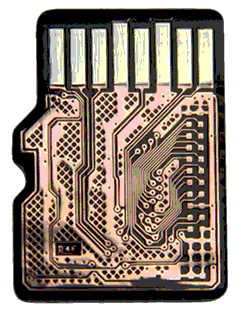
Yes, data can be recovered from a broken micro SD card — even one snapped, bent, water-damaged, or completely unrecognized. eProvided physically exposes the card’s internal circuitry using a pinout strategy most recovery companies don’t have the equipment or expertise to perform, reading your photos and videos directly from the NAND memory. 98% success rate, free evaluation, and No Data, No Data Recovery Fee — since 1999.
MicroSD cards are among the most physically fragile storage devices manufactured today. With circuits narrower than a human hair and memory layers thinner than a sheet of paper, a single crack can sever the data pathways entirely. Standard recovery software cannot help when the card won’t mount, isn’t recognized, or has physical damage. That’s where professional micro SD card recovery becomes essential — and where eProvided excels. If you’ve been told your card is “unrecoverable,” there’s a strong chance we can still retrieve your files.
eProvided averages a 98% success rate on micro SD card recovery cases. We handle every manufacturer — SanDisk, Samsung, Kingston, Lexar, PNY, Transcend, and dozens more. Every case starts with a free evaluation and our guarantee: No Data, No Data Recovery Fee. Call (866) 857-5950 or start your free evaluation online.
Table of Contents
- What Is Micro SD Card Recovery?
- How to Recover a MicroSD Card
- Common Causes of Failure
- Drones, GoPro & Smartphone Cards
- Cracked & Physically Broken Cards
- NASA-Proven Recovery Technology
- Micro SD Card Recovery Near Me
- Recovery Cost
- Is Your Card Recoverable? (Checklist)
- What Our Customers Say
- Frequently Asked Questions
- Related Recovery Services
Free Micro SD Card Recovery Evaluation
Ship your card to our lab — we diagnose the failure for free. No Data, No Data Recovery Fee.
Get My Free EvaluationOr call (866) 857-5950
What Is Micro SD Card Recovery?

Micro SD card recovery is the process of extracting data from a microSD card that has failed due to physical damage, corruption, or electrical malfunction. Unlike standard hard drive recovery, microSD cards are monolithic devices — the controller, NAND flash memory, and interface are all integrated into a single silicon package. There are no separate chips to desolder or swap. Recovery requires physically sanding the card’s surface to expose the buried circuit traces, then soldering microscopic wires directly to those traces.
This is called the pinout method, and it’s the foundation of professional micro SD data recovery. Unlike file-scanning utilities, our microsd recovery process physically bypasses the dead controller, so failure modes that look hopeless to software — unrecognized cards, “0 bytes” readings, no-power cards — are still fully recoverable in our lab. eProvided has refined this technique across 27+ years and thousands of cases. The pinout connections allow us to read raw data directly from the NAND flash memory; from there, specialized software reconstructs your files — photos, videos, documents, whatever was stored.
According to the SD Association, modern microSDXC cards can hold up to 2TB of data on a chip smaller than a fingernail. That’s an enormous amount of irreplaceable data riding on an incredibly fragile piece of silicon. When it fails, you need engineers who understand the physical architecture — not just software.
How to Recover a MicroSD Card — Our Process
To recover a microSD card professionally, we follow a five-step lab process. Software can only help while a card still mounts; everything beyond that requires hardware-level work. Here is exactly how our micro sd recovery service handles your card:
- Free evaluation: fill out the recovery form and ship your card to our Las Vegas lab. Diagnosis is completed within 24 hours of arrival.
- Microscope inspection: we examine the card under high magnification for cracks, bent substrates, corrosion, and trace damage.
- Pinout exposure: the card’s surface is precision-sanded to expose internal NAND traces — the monolithic equivalent of chip-off recovery.
- Raw NAND read: microscopic wires are soldered to the traces and a complete binary dump is taken, bypassing the dead controller entirely.
- File reconstruction & delivery: our software rebuilds the file system and your files are returned on new media or secure download.
Trying to recover a microSD card at home with software is safe ONLY while the card still appears in Windows or macOS and the loss is logical (deleted files, accidental format). The moment a card is unrecognized, shows 0 bytes, or has visible damage, every additional read attempt risks making professional recovery harder. Stop, and get the free evaluation first.
Common Causes of Micro SD Card Failure
After thousands of micro SD card recovery cases, the same failure patterns appear again and again:
- Physical snapping or bending — cards crack in wallets, pockets, and card readers; phones crushed in accidents take the card with them
- Water and corrosion — washing machines, oceans, pools; salt water is the most aggressive on copper traces
- Wear-out — NAND cells endure a finite number of write cycles; dashcams and security cameras hit the limit fastest
- Sudden removal during a write — pulling the card mid-write corrupts the file table and can brick the controller
- Counterfeit cards — fake-capacity cards overwrite their own data once the real (smaller) capacity fills up
- Heat and static — cars in summer, dryers, and electrostatic discharge during handling
Whatever the cause, the rule is the same: if the NAND silicon itself is intact, your data is very likely recoverable through the pinout method — even when the card is in pieces.
Micro SD Recovery for Drones, GoPro, Dashcams & Smartphones
Modern microSD failures usually arrive inside a device story: a drone that fell from 120 metres, a GoPro that went into the surf, a dashcam needed for an insurance claim, a Nintendo Switch with years of saves, or an Android phone that was run over. We recover them all — the device doesn’t matter, the card’s NAND does. Flight logs, 4K video, RAW photo bursts, game saves, and app data are reconstructed the same way: raw NAND dump first, file system second.
For crash and incident cases we preserve original timestamps and file structures, which matters for insurance and legal evidence. If your card was in a camera, see our digital image recovery service; for full-size SD, CF, and legacy formats, our broken memory card recovery page covers every card type ever made.
Can You Recover a Cracked or Physically Broken Micro SD Card?
Yes — physically broken micro sd card recovery is our specialty. A cracked card is unrecoverable by any software, but as long as the NAND region of the silicon is intact, our engineers can expose the traces on either side of the crack and read the memory directly. We have recovered cards returned to us in two pieces, cards crushed inside phones, and cards other labs declared dead.
The honest exception: if the crack runs through the NAND die itself (roughly the middle third of the card), the storage cells are physically destroyed and no lab on earth can read them. That is the minority of cases — most cracks run through the contact or controller regions, which the pinout method bypasses completely. A card snapped clean in half is covered step-by-step in our guide.
Cracked, Bent, or Unrecognized Card?
Ship it to our lab for a free evaluation. We recover cards other companies turn away.
Get My Free EvaluationNASA-Proven Recovery Technology
eProvided has been used by NASA, the FBI, U.S. Special Agents, and the Department of the Navy for flash-memory recoveries demanding maximum success rates and absolute confidentiality. Bruce Cullen personally recovered flight data from NASA’s Helios aircraft after it crashed into the Pacific and sat in salt water for over 60 days — the same NAND-level techniques we apply to your microSD card.
That pedigree matters because microSD recovery is unforgiving: one careless pass of sanding, one overheated solder joint, and the data is gone. Choose a lab that has done this at the highest level, on the most irreplaceable data, for 27+ years.
Micro SD Card Recovery Near Me — Nationwide Mail-In Service
Searching for micro sd card recovery near me? You don’t need a local shop — you need the right lab. eProvided serves all 50 states by insured mail-in service from our Las Vegas facility: overnight your card from anywhere in the U.S. and the free evaluation is done within 24 hours of arrival. Local repair shops send monolithic card work to specialty labs anyway; shipping direct to our lab saves the middleman markup and days of delay.
How Much Does Micro SD Card Recovery Cost?
Micro SD card recovery pricing varies with damage severity and card capacity, and every case begins with a free evaluation — we assess the card and quote before any work begins. Logical recoveries sit in a lower tier; pinout work on physically damaged cards costs more because of the precision lab time involved. Our policy is simple: No Data, No Data Recovery Fee. See data recovery pricing or get a personalized quote.
Is Your Micro SD Card Recoverable?
| Scenario | Recoverable? | Recovery Method |
|---|---|---|
| Card not recognized / “please insert disk” | Very likely | Pinout NAND read, controller bypassed |
| Cracked or bent card | Very likely | Pinout method around the damage |
| Water or salt-water exposure | Very likely | Corrosion cleaning + pinout read |
| Deleted files, card still mounts | Very likely | Logical recovery, no surgery needed |
| Snapped in half outside NAND area | Likely | Trace reconstruction + pinout read |
| Crack through the NAND die itself | Not recoverable | Storage cells physically destroyed (rare) |
What Our Customers Say
Read verified reviews on Trustpilot or join the conversation on our Reddit community.
Frequently Asked Questions: Micro SD Card Recovery
How much does micro SD card recovery cost?
Recovery pricing varies based on damage severity and card capacity. Every case begins with a free evaluation — we assess the card and provide a detailed quote before any work begins. Our policy is simple: No Data, No Data Recovery Fee. View our pricing page for general ranges.
Can you recover data from a micro SD card that is not recognized?
Yes. An unrecognized microSD card typically has a failed controller or damaged contact pins — the NAND flash cells holding your data are usually intact. Our pinout method bypasses the controller entirely, reading data directly from the memory cells. We recover data from cards that show as “no media,” “RAW,” “please insert a disk,” or simply don’t appear at all.
How long does micro SD card data recovery take?
Standard recovery takes 3–7 business days from the time we receive your card. Expedited service is available for urgent cases — we’ve delivered results in as fast as 48 hours for time-sensitive recoveries like legal evidence or insurance claims. Call (866) 857-5950 to discuss expedited options.
Is it safe to attempt micro SD recovery at home with software?
Only if the card is still recognized by your computer and the damage is purely logical (deleted files, formatting). If the card has physical damage — cracks, bends, water exposure, or isn’t recognized at all — do NOT attempt software recovery. Repeated read attempts on a physically damaged card can cause further degradation. See our guide on broken SD card recovery.
Do you recover data from water-damaged micro SD cards?
Yes — including salt water, fresh water, and humidity damage. Salt water is especially aggressive on copper traces, but the NAND memory cells themselves are sealed and often survive immersion. Our engineers clean corrosion under magnification and rebuild connections to the intact memory. We successfully recovered NASA Helios data that was submerged in the Pacific Ocean for weeks.
What types of files can you recover from a micro SD card?
We recover all file types: photos (JPEG, RAW/CR2/NEF/ARW, PNG, HEIF), videos (MP4, MOV, MKV), documents, contacts, app data, game saves, audio files, GPS/flight logs, and more. The file type doesn’t change our approach — we reconstruct the complete file system from the raw NAND data.
Can you recover a micro SD card that went through the washing machine?
We’ve done it many times. Agitation plus detergent creates corrosion and potential physical damage, but the NAND flash cells are remarkably resilient to moisture. As long as the card wasn’t subjected to extreme dryer heat afterward, recovery prospects are very good. Ship it to us and we’ll evaluate it free of charge.
Do you offer chip-level microsd recovery when software can't see the card?
Yes — chip-level microsd recovery is our specialty. When Windows, macOS, or Android reports the card as unreadable, corrupt, or simply absent, the controller or contact pins have failed. Our engineers expose the card’s internal NAND traces using the pinout method and read your photos, videos, and documents directly from the memory cells. Software-based tools cannot do this. Every microsd recovery case starts with a free evaluation and our No Data, No Data Recovery Fee guarantee.
Further Reading: SD & Memory Card Guides
- Micro SD card broken in half — what to do next
- Broken SD card recovery guide
- Damaged microSD cards: bent, cracked, and crushed
- How to protect your SD and microSD cards
Ready to Get Your Card’s Data Back?
Since 1999 — 27+ years of micro SD card data recovery. 98% success rate. No Data, No Data Recovery Fee.
Get My Free EvaluationOr call (866) 857-5950 • 9527 Knopfler Ln, Las Vegas, NV 89148