
Used by NASA · the FBI · the U.S. Navy · Since 1999
Prevent a Data Recovery Emergency with a Virtual Private Network
- No Data, No Data Recovery Fee
- Free, confidential evaluation
- 4.9 / 5 on Trustpilot (67 reviews)
- Worldwide lab recovery
Telecommuting is a growing trend in the business world. Letting employees work from remote locations can offer substantial cost savings, but those savings may come at a price. Employees logging onto your corporate systems from many locations and many devices can open the company to a security breach. One proven way to reduce that risk is a Virtual Private Network, or VPN, backed by a solid data safety plan for the day something fails anyway.
Does a VPN Protect Data From Loss or Corruption?
No. A VPN encrypts data in transit, but it cannot protect against loss from drive failure, ransomware or accidental deletion. It is a privacy and security tool, not a backup. When a VPN-connected device still loses files, eProvided’s lab recovers them with a 98% average success rate since 1999.
“A VPN guards your data on the road. It does nothing for the drive that fails at home.” — Bruce Cullen, founder, eProvided
- What Is a Virtual Private Network?
- Why Remote Work Needs a VPN
- Unsecured Wi-Fi Connections
- The Home Router Is Part of the Network
- Protecting Data with a Virtual Private Network
- What a VPN Covers and What It Does Not
- Data Loss Solutions with Proper Data Storage Practices
- Where a Remote Worker’s Files Actually Live
- The Home File Server
- A Backup Plan That Fits Remote Work
- Real Cases From Work Laptops and Home Offices
- Reporting Security Problems to Prevent Data Loss
- Five Things Not To Do
- Customer Reviews
- Frequently Asked Questions
- Recovery Services for Every Storage Device Class
What Is a Virtual Private Network?
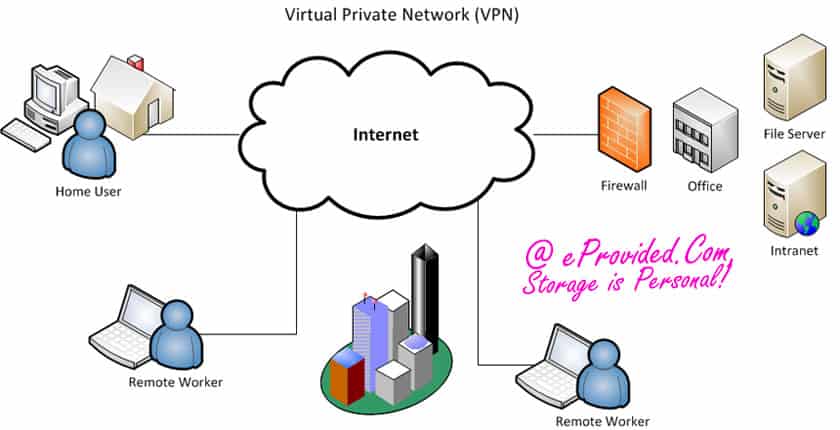
A virtual private network (VPN) is software that builds an encrypted tunnel between a device and a network, so traffic crossing the internet or public Wi-Fi cannot be read by anyone in between. It hides data in transit. It does not store, copy or protect the files already sitting on your drive.
That is the virtual private network meaning in one line: a private path across a public network. NIST describes IPsec, the open standard behind many VPNs, as a framework for private communications over Internet Protocol networks, and its guide to IPsec VPNs helps organizations reduce the risk of sending sensitive information across networks.
The rest of this page follows from that split. The VPN protects the trip. The drive holds the files. When the drive fails, the VPN has nothing to offer, and the work that was never copied elsewhere is at risk.
Why Remote Work Needs a VPN
 Enlarge
A network built on a VPN framework is a smart choice. VPNs give IT departments confidence, and once one is in place, managers can work with their minds at ease. Properly maintained networks streamline workflow, and saving time while preventing problems reduces cost. A VPN also reduces unnecessary technology: sell the old equipment and upgrade to a more secure workplace.
Companies with a wide range of devices face the most risk. Laptops, phones and home desktops each connect in their own way, and each one is a door into company systems. A VPN puts one secure tunnel in front of all of them.
Unsecured Wi-Fi Connections
 Enlarge
In addition to viruses and other malware, employees may connect through unsecured Wi-Fi. Free Wi-Fi seems to be available everywhere, and the majority of these locations have huge security holes. Even employees working from home run their own Wi-Fi routers, and many are set up without proper security protocols.
This puts confidential business information at risk of being intercepted and stolen. The rapid spread of different devices and operating systems makes it a major challenge, and thieves may connect to your network directly. Have a recovery plan, and secure all Wi-Fi connections.
On a shared hotspot, every device in the room sits on the same network as yours, which is why the traffic itself needs its own protection. A VPN supplies that protection only while it is switched on, so connecting to it should be the first thing a remote employee does after joining any network, and the last thing they disconnect. The plan for the day a laptop fails on the road should name the lab to call in advance, and our guide to choosing a data recovery company lists what to check.
A VPN scrambles data moving in both directions, so a file intercepted on public Wi-Fi is unreadable to the person who grabbed it. It does nothing, however, for the copy sitting on a failing laptop drive.
The Home Router Is Part of the Network
 Enlarge
For a remote employee, the router on the bookshelf is the first piece of company infrastructure the work traffic touches, even though nobody in IT bought it or has ever logged into it. CISA’s alert on enterprise VPN security asks organizations to update VPNs, network infrastructure devices and the devices used to remote into work with the latest patches. A router that has not been updated in years is the weak link in that chain.
The same alert warns that VPNs run around the clock, which makes them less likely to be patched, and that attackers send more phishing emails to teleworkers to steal usernames and passwords. It advises multi-factor authentication on every VPN connection. A strong tunnel does not help if the login that opens it has been phished.
None of this protects the data on the laptop itself. A well-patched router and a well-configured VPN can still sit in front of a hard drive that clicks, an SSD that disappears, or a flash drive that asks to be formatted. Security keeps strangers out. Backups and a recovery plan cover the failures that come from inside the machine.
Protecting Data with a Virtual Private Network
Alongside antivirus software and other standard security measures, a Virtual Private Network is a low-cost way to reduce the security risks of telecommuting. The VPN protects data being transmitted in both directions, between your servers and your remote employees. To provide that security, it scrambles the data moving back and forth, so the traffic is unrecognizable even if an unauthorized party gets hold of it. That offers your business valuable protection when employees send and receive files from public, unsecured access points.
Beyond installing a VPN, it is important to assess or restrict the use of unsecured file sharing programs. Dropbox is our top choice if one is needed. By setting up the VPN and a list of unacceptable practices, you go a long way toward reducing the chance that something corrupts your network.
What a VPN Covers and What It Does Not
The quickest way to see where the VPN stops is to list the common ways remote work loses data or exposes it, and check which tool answers each one.
| VPN Coverage: Threat by Threat | ||
|---|---|---|
| What goes wrong | Does a VPN help? | What actually does |
| Someone reads traffic on public Wi-Fi | Yes. The traffic is scrambled in transit | A VPN that is kept current |
| A password is stolen or phished | Not by itself | Multi-factor sign-in on every VPN connection, as CISA advises |
| The VPN gateway is out of date | No. It becomes the weak point | Regular patching of the VPN and the network devices around it |
| A laptop drive fails | No | A second copy first, then a recovery lab if the drive dies |
| Ransomware encrypts the files | No | Offline backups that the malware cannot reach |
| A file is deleted by mistake | No | A backup with version history |
| A USB stick breaks or asks to be formatted | No | Never keeping the only copy on the stick |
Lost Business Data Despite Your Safeguards?
Laptop drives, SSDs, servers and flash media — get a free, confidential evaluation.
Start My Free Evaluationor call (866) 857-5950 now
Data Loss Solutions with Proper Data Storage Practices
Even with protocols and protections in place, data loss is still possible. You need a data recovery plan that keeps critical information from vanishing. Tell telecommuting employees that they should not attempt any data recovery themselves: running repair tools on a failing drive can overwrite the very files you need.
Your IT department should have a data recovery plan in place and continual access to a company that specializes in data recovery services. Whether the loss happens on the corporate network or on a remote laptop, a recovery expert can help retrieve and restore files with minimum time and data loss.
Choose a company that has been in business for over 10 years, because most companies fail within 5. eProvided has been in business since 1999, more than 27 years. Our lab handles the drives remote staff actually use: the spinning disks in laptops and desktops, and the solid-state drives in newer laptops most businesses now buy. Questions? Call us toll-free at (866) 857-5950.
Where a Remote Worker’s Files Actually Live
 Enlarge
Ask a remote employee where the work files are and the answer is rarely “on the company server.” Files collect on the laptop’s own drive because that is where the document was saved. They travel on a USB stick between the office and the kitchen table. They land on an external drive somebody bought for backups, and on a spare computer in the spare room that grew into a file server. Every one of those places is outside the VPN’s reach, and each fails in its own way.
That is why the table below pairs each place with its usual failure and the one safe move. In almost every row the safe move is the same: stop using the device, so the files that are still there stay there. Our guide to hard drive recovery goes deeper on laptop and desktop disks, and the article on flash drive data loss covers the sticks that remote staff carry between locations.
| Where Work Files Sit and How Each Place Fails | ||
|---|---|---|
| Where the files sit | Typical failure | First safe step |
| Work laptop with a hard drive | Clicking, “boot device not found”, drive missing from the system | Power it off and stop retrying |
| Work laptop with an SSD | Laptop will not start, drive vanishes from the system menu | Power off and stop; do not run repair routines |
| USB stick carried between office and home | “You need to format the disk”, or a bent or snapped plug | Click Cancel, never Format; unplug it |
| External drive used as a backup | No drive letter, or it is not read at all. See external drive failures | Try one other computer once, then stop |
| Home file server with several drives | Two or three drives disappear together | Power it down and note which drive sat in which bay |
The Home File Server
 Enlarge
A spare computer used as a file server is the hardest of these places to think clearly about, because several drives live in one box. They share a power supply, cables and a controller, so one shared fault can make every drive vanish at once. When that happens, the drives are not necessarily all dead. A power event is one common reason several drives drop out together, and it is the first thing to ask about.
CISA’s backup guidance makes the underlying point plainly: backup files stored on the same internal drive as the originals are just as vulnerable to damage. The same logic applies to a box where the only backup is another drive in the same case. Keep notes of which drive sat in which bay before anything is unplugged. That order helps the lab, and nothing else is lost by writing it down.
A Backup Plan That Fits Remote Work
CISA’s data backup options paper describes the 3-2-1 rule: keep three copies of any important file, one primary and two backups, on two different media types, with one copy stored off site. For a remote worker that can mean the laptop, an external drive, and a copy outside the home or business facility.
The same paper warns that rolling backups can silently carry corruption or malware from the primary files into the backups. CISA’s #StopRansomware guide advises keeping offline, encrypted backups of critical data and testing regularly that they can be restored. A backup that has never been restored is a hope, not a plan.
Put the schedule in writing and give it an owner. Decide who checks the backups, how often, and what happens when a remote employee reports that a drive has started acting strangely. The written plan should also name the recovery lab to call, so nobody searches for one in the middle of an emergency. The need-to-know list in our preventative measures guide is a good checklist to hand to staff.
Real Cases From Work Laptops and Home Offices
These are a few of the many cases we have handled since 1999 that involve people working away from the office. Names are removed, the words are the customers’ own, and the outcomes are mixed on purpose.
A flash drive used over the company VPN, December 2014
Case H8PZI2. The owner wrote:
“Used flash drive on 11/24 and 11/25 at my home on my work computer through my company’s VPN, saved the file, closed and packed my computer up for the holiday. When I got in to my office on Monday, the drive couldn’t be recognized on my computer.”
Recovered. The notes record a successful recovery the day after the drive arrived, and a directory list of the files was sent out. The VPN session did its job. The stick still failed, and the file that mattered was on it and nowhere else.
A work-from-home flash drive that asked to be formatted, April 2013
Case EL1VQK. The owner wrote:
“used flashdrive for approximately 1 yr to store files to allow me to work from home; when trying to begin work, received a msg stating I needed to format the flashdrive before i could use it again; to do so, system informed me that all data currently stored would be lost.”
Recovered. The notes record a successful recovery within days of arrival, and the drive went back to the owner. A format prompt on a drive that worked yesterday is the moment to cancel, which is what this owner did.
A stick that failed on a work laptop, January 2015
Case KV8XT7. The owner wrote:
“I used it one my work laptop and came home to finish the on the same work laptop inserted the flash drive and it started to come up with it saying need to be formated. Tried on two other computers and the same thing happens.”
No result. The first-level recovery did not read the drive, the owner declined the advanced quote, and the drive went back. Trying two other computers was the right test: the fault travelled with the drive.
A work laptop drive that died without warning, May 2022
Case P5TMZN. The owner wrote:
“My work laptop hard drive unexpectedly died and I really need access to the folders on that computer’s desktop. It was so unexpected, I didn’t back up everything I need online.”
No result is recorded. The notes show the owner was invited to book a drop-off, and nothing after that. The words are worth keeping because they describe the usual pattern: the files that were never copied are the files that matter.
A home file server where three drives stopped at once, December 2022
Case D-RTVY. The owner wrote:
“I have a computer in my house that I use as a file server. All of a sudden all three hard drives stopped working. I can’t even get them to make noise.”
No result is recorded; only the form was submitted. It shows the shared-fault pattern described above, where drives that share a box fail together. The owner also did not know which drive held the main files, which is why bay notes help.
A company-encrypted external drive and a decommissioned server, August 2019
Case W56ZFP. The owner wrote:
“My company had [disk encryption] for their company laptops. I plugged in an external drive and had to encrypt it to get access to the drive/files. […] my company took back my laptop, where the ext drive was originally encrypted and they have decommissioned the encryption server.”
No result is recorded; only the form was submitted. This is the hazard behind the encryption answer in the FAQ below. When a company encrypts a drive and then retires the laptop and the key server, the files are scrambled and the key is gone.
An encrypted work SSD that failed soon after start-up, March 2019
Case XT6TCN. The owner wrote:
“Hard drive fails soon after boot. […] the data is encrypted. […] This was encryption added by [a security vendor’s] encryption server. If I’m not mistaken, it can only be decrypted by our server, there is not a key I can provide.”
No recovery is recorded. The lab studied the drive for about three months, the notes record that the data was encrypted and the key was not available, and the drive went back. Encryption does not change whether we can read a failing drive. It changes what the copy is worth without the key. Our guide to encrypted devices explains the difference.
Reporting Security Problems to Prevent Data Loss
Let employees know the risks that come with telecommuting, and encourage them to report any security problem or data loss. It comes with the territory. They should know you have procedures in place to recover from data loss emergencies. If you know your workplace is not prepared, tell your CEO.
Virtual private network plans are a huge bonus to any data center or workplace. Knowledge from everyone in the organization is key, and a fast response is best. If you see something strange, report it. Do not wait for someone else.
Do
- Require a VPN for every remote connection to company systems
- Keep a written data recovery plan and a recovery lab contact on file
- Back up remote employees’ work to a second location on a schedule
DON’T Do
- Don’t treat a VPN as a backup — it protects data in transit only
- Don’t let employees run recovery software on a failing work laptop
- Don’t allow unsecured file sharing programs on company devices
Five Things Not To Do When a Work Drive Fails, and Why
Most work files that cannot be recovered were put at risk by what happened after the first failure. These five habits cause most of that.
- Do not keep restarting the laptop to see if it comes back. A drive that is failing may be damaged a little more by every power-up, so the number of tries you have is limited.
- Do not click Format when a stick or drive offers it. The prompt appears when the file system cannot be read, and formatting writes a new one over the old.
- Do not hand the laptop back, wipe it or retire the encryption server first. Once the key or the machine is gone, the files may be unreadable even from a perfect copy, as in the encrypted cases above.
- Do not assume the VPN or the company server kept a copy. A VPN carries files and stores nothing, and folders that look shared are often only on your own drive.
- Do not carry the only copy of a work file on a USB stick. Sticks are the part that gets bent, dropped and pulled out mid-save, and several of the cases above began that way.
What Our Customers Say
Frequently Asked Questions
Lost Critical Data? We’ll Evaluate It Free.
Hard drives, SSDs, SD cards and flash media — one lab, one free evaluation.
Start My Free Evaluationor call (866) 857-5950 now
Recovery Services for Every Storage Device Class
A VPN protects data in transit. When a drive fails anyway, eProvided recovers from every storage class: