
Used by NASA · the FBI · the U.S. Navy · Since 1999
How NAND Flash Recovery Works (Chip-Level Explained)
- Written by a 27-year chip-level recovery engineer
- Works on USB drives, SD cards, monoliths & more
- The exact process, step by step, no jargon
- No Data, No Data Recovery Fee if a chip ever fails on you
How Does NAND Flash Recovery Work?
NAND flash recovery reads the memory chip directly, bypassing whatever failed around it. The chip is desoldered and read on programmer hardware that speaks its raw protocol, then the data is reassembled. It works on any single-chip device, with a 98% success rate when the chip is undamaged.
“The chip almost never fails first — it's the controller, the connector, or the board around it. Read the chip directly and the data is usually all still there.” — Bruce Cullen, founder, eProvided
NAND flash memory sits inside almost everything that stores data without a spinning disk — USB drives, SD cards, SSDs, phones, dashcams. When one of those devices dies, the instinct is to assume the files went with it. Almost always, they didn’t: the failure is in the controller, the connector, or the circuit board around the chip, not the chip itself. After 27+ years of nand recovery cases — NAND flash data recovery included — on our bench, this guide walks through exactly how NAND flash recovery works — the equipment, the process, and why reading the chip directly succeeds where the device itself has completely failed.
NAND flash recovery works by desoldering the memory chip from a failed device and reading it directly on specialized programmer hardware, bypassing the dead controller, connector, or board entirely. Because the chip stores raw data independent of whatever failed around it, this succeeds roughly 98% of the time — even when the device itself is completely unresponsive.
Do RIGHT NOW
- Stop using the device immediately once it fails
- Keep any snapped or loose parts together
- Note exactly what happened before it stopped working
- Check whether it still powers on at all, even briefly
DON’T Do
- Don’t open the device yourself without proper tools
- Don’t attempt to reflow or reheat the board at home
- Don’t keep power-cycling a device that won’t connect
- Don’t run recovery software on a device with physical damage
Worried about files on a device with a failed NAND chip? Send it in for a free evaluation before doing anything else, or call (866) 857-5950 and describe what happened.
- Understanding NAND Flash Technology
- Why NAND-Based Devices Actually Fail
- The Chip-Off Recovery Process, Step by Step
- The Equipment Behind Chip-Level Recovery
- When Chip-Off Is NOT the Right Method
- Why Choose eProvided for NAND Recovery
- What Our Customers Say
- Frequently Asked Questions
- Related Articles
- Recover Data from a Failed NAND-Based Device
- Related Recovery Services
Understanding NAND Flash Technology
Before the nand recovery process makes sense, it helps to understand what the chip itself actually is.
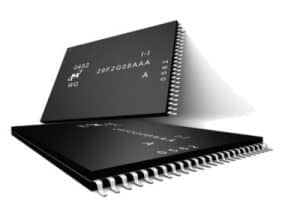
NAND flash is non-volatile memory — it holds data with no power at all, which is why a device can sit dead in a drawer for years and the files are still sitting in the chip. Every USB drive, SD card, and monolithic storage device is built the same basic way: one or more NAND chips holding the data, wired to a controller that manages reading, writing, and wear leveling. When people ask how NAND flash recovery works, the honest answer starts here — the chip is almost always the toughest, most reliable part of the whole device.
NAND issue reports on our bench break down predictably: roughly a third are controller failures, a third are physical damage to the connector or board, and the rest are logical corruption of the file system sitting on top of an otherwise-healthy chip. In none of these cases has the chip itself typically failed — which is exactly why chip-level recovery works as often as it does.
Why NAND-Based Devices Actually Fail

A NAND failure almost never means the memory cells themselves gave out — and understanding why is the key to why NAND recovery works as reliably as it does. Controllers fail from power surges, static discharge, or simple age — the small chip managing reads and writes is more delicate than the NAND chip it’s protecting, and a nand flash failure at the controller level is far more common than one in the memory cells themselves. Bad blocks develop on every NAND chip over its life, which is why every controller tracks and maps around them — a normal part of aging, not a sign of failure on its own. Connectors snap or wear loose from repeated plugging. Boards crack from being dropped or bent. Firmware can corrupt during an interrupted write, leaving the controller unable to make sense of data that is, physically, still intact underneath it.
This is the core insight behind chip level data recovery: the failure and the data live in two different places. A dead controller doesn’t erase the chip it was managing — it just goes deaf to it. Recovery works by talking to the chip directly, in a language the broken controller never has to understand again. This holds true regardless of brand — Toshiba, Western Digital, Seagate, and every other manufacturer build their controllers to fail the same predictable ways, and the chip underneath behaves the same way once you bypass that controller. It also applies to newer formats like CFexpress, not just the older card and drive standards.
The Chip-Off Recovery Process, Step by Step

Chip-off recovery is a fixed sequence, not an improvised repair — the same five steps run every time, in the same order, whether the device is a USB drive (see what happens when a stick snaps), an SD card, or a monolithic drive. The order is fixed for a reason: removing a chip is a one-way step, so nothing gets desoldered until the evaluation has ruled out a gentler route such as reflowing a cracked joint or swapping a broken connector. Once a chip does come off, it is imaged in full before any reconstruction starts, and all later work runs on that copy, never on the original part. If a reconstruction attempt goes wrong, we go back to the image and try again without touching the chip a second time. That single-handling rule protects chips that are already weak from the fall, the short, or the heat that killed the device in the first place. Each step below either succeeds cleanly or tells us exactly why it didn’t before the next one starts, which is what makes the process as reliable as it is:
| How NAND Flash Recovery Works — The Real Steps | ||
|---|---|---|
| Step | What happens | Why it matters |
| 1. Evaluation | Diagnose whether the failure is controller, connector, board, or logical | Determines whether board repair or chip-off is the right path — never guessed |
| 2. Desoldering | The NAND chip is carefully removed from the board under controlled heat | One wrong temperature curve can damage the chip — precision matters here |
| 3. Reading | The bare chip is read on programmer hardware that speaks its native protocol | Bypasses the dead controller entirely — the chip never has to work again |
| 4. Reconstruction | Raw data is de-scrambled, error-corrected, and the file system rebuilt | A raw chip dump isn’t readable files yet — this step turns bits back into your data |
| 5. Verification | Recovered files are checked and cataloged before delivery | Confirms what came back intact before you pay for anything |

Every step above happens in-house, on hardware built for exactly this purpose. Nothing about NAND flash recovery involves guessing — each stage either succeeds cleanly or tells us precisely why it didn’t, before moving to the next. This is also why every NAND failure gets a real diagnosis before any physical work starts: the process only makes sense once you know exactly which layer failed. Reconstruction is usually the longest stage by far. Every controller maker spreads data across the chip in its own pattern, adds its own error-correction codes, and often XOR-scrambles the stream before writing it, so the raw dump has to be matched against the right controller profile before a single file name appears. On a drive whose controller model is well documented that can go quickly; on an unusual or unmarked controller it means working the pattern out from the dump itself, page by page, until the file system structure lines up and the folders become readable again.
The Equipment Behind Chip-Level Recovery

Chip-off recovery depends on hardware most repair shops never own: a precision hot-air rework station to remove the chip without heat damage, a NAND programmer capable of reading raw dumps from dozens of chip packages (TSOP, BGA, and others), and reconstruction software that understands wear-leveling, bad-block tables, and the specific scrambling algorithms each controller manufacturer uses. Memory flash recovery without this equipment is limited to whatever a failed device is still willing to say through its own broken controller — which is exactly the limitation chip-off recovery exists to bypass. The programmer side matters as much as the rework station. A single NAND package can hold several dies stacked inside it, each needing its own read pass, and reading the same pages more than once lets the software pick the cleanest copy of each weak cell. That repeat-read approach is how a chip with worn or marginal cells still gives up a usable image.
When Chip-Off Is NOT the Right Method
Nand recovery is not a one-method-fits-all process, and being honest about that is part of doing it right. On monolithic devices — USB drives, SD cards, most action-cam and dashcam media — the decryption key, if any, lives nowhere but the chip itself, so reading it directly recovers real, usable data. Modern phones and current-generation SSDs work differently: their controllers hold an encryption key fused into that specific chip, so the files are locked to the device’s own controller, not to the memory chip. Pulling the NAND chip from one of those returns unreadable, scrambled data, and even a donor controller of the same model derives a different key. On those device classes, the correct path is repairing the original board or, on phones, moving the processor and NAND together to a donor board — never chip-off alone. If your device is a modern phone or SSD rather than a USB drive, SD card, or similar monolithic media, our NAND-not-detected guide covers what to check first.
Why Choose eProvided for NAND Recovery
eProvided nand recovery, in one sentence: we choose the method that fits the device, never the other way around.
eProvided has performed nand recovery since the earliest days of flash storage, reading NAND flash chips across every controller and chip package on the market. The same in-house lab performs board-level repair, donor-board transplants, and chip-off extraction — choosing the right one for each device rather than defaulting to a single method — the same discipline that makes our NAND recovery success rate hold steady across brands and chip packages. eProvided has recovered data for NASA’s Helios mission after saltwater exposure and assisted with NASA storage-related consulting, backed by the same “No Data, No Data Recovery Fee” guarantee on every case.
What Our Customers Say
Frequently Asked Questions
Related Articles
More NAND Flash Recovery Guides for further reading: our NAND-not-detected troubleshooting guide is linked above, and what NAND flash memory actually is explains the chip technology this whole nand recovery process depends on in plain English. The full NAND flash data recovery service page covers what a professional evaluation involves — each covers a different angle on the same underlying nand recovery topic.
Recover Data from a Failed NAND-Based Device
USB drive, SD card, SSD, or any device built around NAND flash — our engineers will tell you exactly what's recoverable. Free, no obligation, confidential.
Start My Free Evaluationor call (866) 857-5950 now
Recovery Services for Every Storage Device Class
Whatever built-in NAND chip your device uses, eProvided recovers it from one lab: